
The most common typing mistakes are looking down, letting the index fingers do too much, reaching from a lost hand position, practising only easy text, rushing every run, and ignoring tension. Fix one habit at a time and use the next result to check whether the change helped.
- Most technique problems are easier to fix when the practice is slow and narrow.
- A high short-test score can hide weak punctuation, capitals, and endurance.
- Pain is not a normal part of improvement. Stop and change the setup when typing hurts.
Free Keytopia typing test
Take a typing test and set an honest starting point
A clean baseline shows your WPM, accuracy, errors, consistency, and the keys that need attention first.
- PaceAverage, raw, peak and low WPM
- ControlAccuracy, errors, consistency and CPM
- TimingReaction, overlap, hold, rhythm and recovery
- PatternsTimeline, heatmap, word, key and bigram speed
No account needed. Save your history after sign-in.
Looking down after every mistake
Looking down feels helpful because it solves the next key. It also teaches the eyes to keep solving key location.
When you get lost, find F and J by touch. Reset the hands and look at the screen. Use text that is easy enough to finish without panic.
If the habit is strong, cover the hands for one calm minute. Add time only when the short block feels controlled.
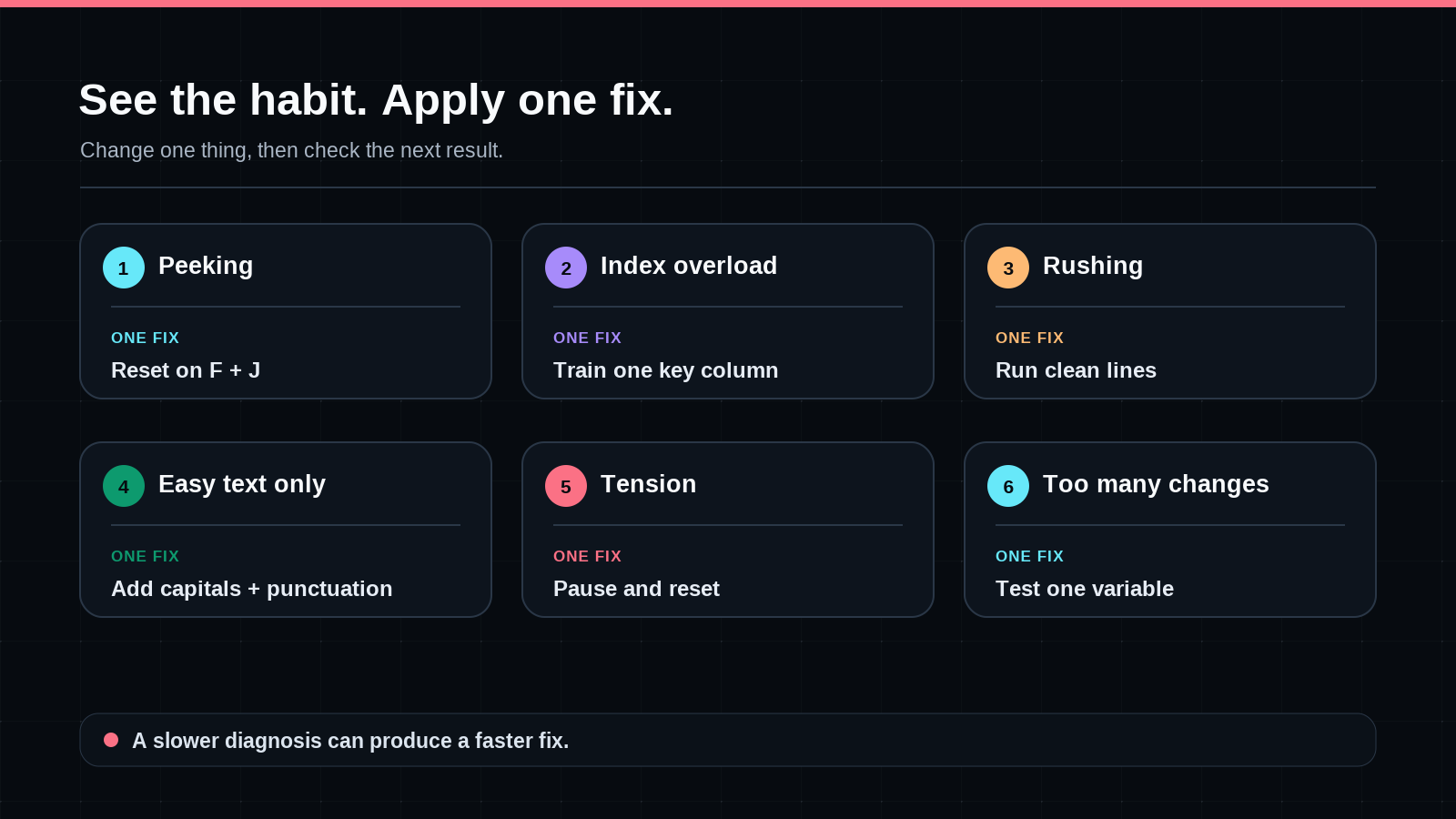
Letting the index fingers do all the work
Index fingers are strong and easy to control. Beginners often use them for keys that belong to the middle, ring, or little fingers.
This creates long reaches and leaves the outer fingers untrained. Slow down and practise one column at a time. Return to home position after each reach.
The standard finger map is a guide. Adapt it when comfort, mobility, or keyboard shape requires a different safe method.
Rushing every practice run
A test can become a repeated attempt to prove that you are fast. That is not the same as practice.
Give each run one job. Use one for clean accuracy. Use one for weak keys. Use one short block for speed. Use one longer block for endurance.
When every run has a purpose, a slower score can still be a successful session.
Practising only easy lowercase words
Simple words are useful for early rhythm. Real writing also contains capitals, punctuation, numbers, names, and longer sentences.
Add difficulty in layers. Turn on punctuation. Add the number row. Use quotes or custom text. Practise the symbols your work or exam requires.
Transfer matters more than one friendly word list.
Holding tension in the hands and shoulders
Speed does not require hard key presses.
Check the shoulders, jaw, wrists, and grip after each minute. Move the keyboard closer if you are reaching. Use a height that lets the shoulders relax. Take a break before tired form becomes repeated form.
Stop if typing causes pain, numbness, or tingling. A typing article cannot diagnose a health problem. Seek qualified care when symptoms persist.
Changing too many things at once
A new keyboard, layout, chair position, word list, and practice method can make the score move in either direction. You will not know why.
Keep the test stable. Change one thing for several sessions. Compare accuracy, consistency, and comfort, not only WPM.
Good practice is a small experiment. One change and one clear result is enough.
Match the result signal to the visible habit
A result can narrow the search, but you still need to watch the typing habit.
Use this decision guide:
- Large raw-to-final WPM gap: look for rushing, skipped corrections, or panic after mistakes.
- Low consistency with good accuracy: look for pauses, repeated hand resets, or reading one word at a time.
- Heatmap errors around outer keys: look for overreaching or lost home position.
- One slow key with several slow bigrams: check that key's finger path first.
- Long key hold time: look for heavy presses or fingers resting on active keys.
- Slow error recovery: practise one calm correction and return cue.
- Strong short test with late timeline decline: look for tension or an opening pace that is too high.
Do not treat any signal as proof by itself. A passage with many rare words can lower consistency. A new keyboard can change reach. Watch one run, name the visible habit, and then choose a small test for that idea.
Fix one habit with a same-condition A/B test
Change one variable and keep the test conditions steady.
Suppose a typist reaches too far with the right index finger. The baseline is 54 WPM, 93 percent accuracy, and 70 percent consistency. The heatmap shows several errors near Y, H, and N.
Use this A/B session:
- Take one normal one-minute baseline.
- Practise returning the right index finger to J after each reach for three minutes.
- Retake the same test mode for one minute.
- Compare accuracy, errors, consistency, and the same heatmap area.
The second WPM may be lower because the movement is new. The change is still useful when errors fall and the hand returns cleanly. Repeat the session on another day before deciding that it worked.
Do not change the keyboard, finger map, test duration, and posture in the same experiment. If the result changes, you will not know which choice caused it.
Know when practice should stop
A technique drill should not continue through pain, numbness, or growing tension.
Use this stop guide:
- Mild loss of focus: pause, rest, and restart later.
- Repeated sloppy movement: end the drill or make it easier.
- Rising shoulders or clenched hands: stop and reset the workstation and pace.
- Pain, numbness, or symptoms that continue: stop typing and seek suitable professional advice.
Keytopia timing and error data can show when a run changed. It cannot diagnose an injury or replace an ergonomic assessment.
For the next session, reduce the load. Use a shorter test, a calmer pace, and fewer target patterns. If the same discomfort returns, do not use a higher WPM target as the solution.
FAQs
Is it bad to look at the keyboard sometimes?
A quick check is not failure. During skill practice, return your eyes to the screen so the fingers learn location instead of relying on sight.
Should I force the standard finger map?
Use it as a starting point, not a rule that causes pain. Accessibility, hand movement, and keyboard shape can require a safe adaptation.
Why am I fast on word tests but slow in real writing?
Real writing adds thinking, editing, capitals, punctuation, names, and navigation. Practise realistic text and judge the transfer separately from copy-test WPM.
Can a keyboard heatmap prove that my finger technique is wrong?
No. It shows where errors occurred. Watch the actual movement and repeat the same test before changing technique. Keyboard shape, text, layout, and fatigue can also affect the pattern.
Sources
Independent research, official documentation, and source pages behind the claims above.
- Aalto University, observations from 136 million keystrokeshttps://userinterfaces.aalto.fi/136Mkeystrokes/resources/chi-18-analysis.pdf
- OSHA, computer workstation keyboard guidancehttps://www.osha.gov/etools/computer-workstations/components/keyboards
- OSHA computer workstation ergonomics resourceshttps://www.osha.gov/computer-workstations
Key takeaway
Fix one visible habit at a time. Keep the test conditions stable and use the next result to check whether the change worked.
Free Keytopia typing test
Take a typing test and set an honest starting point
A clean baseline shows your WPM, accuracy, errors, consistency, and the keys that need attention first.
No account needed. Save your history after sign-in.
- PaceAverage, raw, peak and low WPM
- ControlAccuracy, errors, consistency and CPM
- TimingReaction, overlap, hold, rhythm and recovery
- PatternsTimeline, heatmap, word, key and bigram speed