
Relearning is usually useful when looking down interrupts work, accuracy is unreliable, or a job or study goal needs better keyboard control. Expect a temporary speed drop. Keep important work on the familiar method while you build touch typing in short separate sessions.
- Hunt-and-peck can work for light use, but it often keeps the eyes on the keyboard.
- Touch typing is a new motor map, so early practice may feel slower.
- You do not need to switch all work at once.
Free Keytopia typing test
Take a typing test and set an honest starting point
A clean baseline shows your WPM, accuracy, errors, consistency, and the keys that need attention first.
- PaceAverage, raw, peak and low WPM
- ControlAccuracy, errors, consistency and CPM
- TimingReaction, overlap, hold, rhythm and recovery
- PatternsTimeline, heatmap, word, key and bigram speed
No account needed. Save your history after sign-in.
The real difference is where attention goes
Hunt-and-peck relies more on finding keys with the eyes and a small group of fingers. Touch typing relies more on position and movement from a known hand location.
The value is not only a higher WPM. Keeping the eyes on the screen makes it easier to notice errors, follow a paragraph, and continue through editing.
Some self-taught typists use a hybrid method and type well. The decision should come from your goal, comfort, and repeated problems, not from shame about technique.
When relearning is worth the effort
Consider rebuilding when:
- You look down so often that you lose the sentence.
- Your fingers travel far and tire quickly.
- Accuracy drops when the text becomes longer.
- Numbers, capitals, or punctuation stop the flow.
- A job, exam, or course requires better keyboard control.
If you type only short messages and the current method is comfortable, relearning may be optional.
Expect a temporary slowdown
The old method is familiar. The new finger map is not.
For the first sessions, touch typing may be much slower. That does not prove the method failed. It shows that you are building a new route.
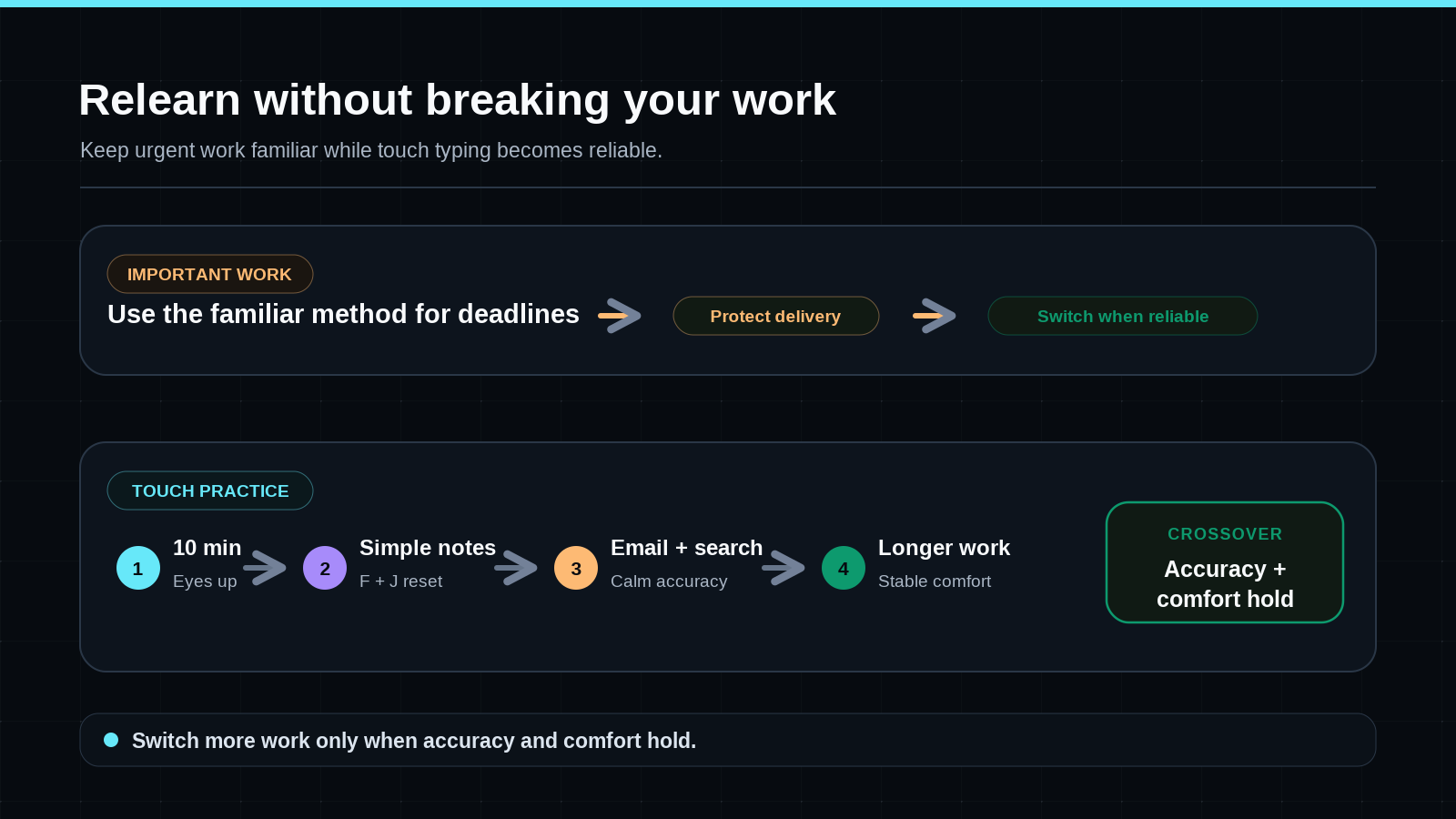
Keep practice short. Do normal urgent work with the method you trust. Use separate lessons for the new map until it becomes reliable.
Use a gradual switch plan
Start with ten minutes of lessons. Then use touch typing for one low-pressure task, such as a personal note.
Move to simple emails and searches. Add longer work only when you can keep the eyes up without frustration.
Track peeking, accuracy, and comfort. WPM may be the last measure to recover.
Keep the method safe and accessible
Standard touch typing is not the only valid method.
Hand mobility, pain, limb difference, tremor, keyboard shape, and other access needs can change the best finger map. Use adaptive equipment or professional guidance when needed.
The useful method is the one that helps you type safely, accurately, and with less interruption.
Run a five-minute method check before you relearn
Do not change technique because somebody said that hunt-and-peck is wrong. Change it when the current method creates a problem you can observe.
Take one normal five-minute task. Use an email draft, a class paragraph, or a typing passage that resembles your work. Record four things:
- How often did you look down?
- Which fingers did most of the work?
- Where did the pace stop, such as capitals, punctuation, or the number row?
- Did accuracy or comfort change during the final two minutes?
Now take a short typing test and save its duration, WPM, and accuracy. The result is a baseline, not a verdict. Relearning is easier to justify when the observation and the score point to the same limit. Frequent visual searches, repeated reaches, and a large fade on longer text are stronger signals than an untidy finger map by itself.
Use a staged switch instead of restarting your work life
A complete overnight switch can make ordinary work needlessly slow. Keep urgent work on the reliable method while the new movements develop in a separate practice block.
Week 1: Learn home position and a small group of keys. Practise for ten minutes. Stop before frustration changes the hand position.
Week 2: Add the remaining letters. Use touch typing for one low-pressure task each day, such as a search or a personal note.
Week 3: Add capitals and common punctuation. Move one recurring email or school task to the new method.
Week 4: Use longer paragraphs. Repeat the original five-minute method check under the same conditions.
Do not expect WPM to recover first. Look for fewer glances, smaller reaches, cleaner punctuation, and a steadier final minute. Those changes show that the new method is becoming usable.
Choose the next step from the result
Use this decision rule after the four-week check:
- Fewer glances and similar accuracy: keep moving low-pressure work to touch typing.
- Fewer glances but many new errors: slow the practice and repeat the weak key group.
- Good short results but a large long-test fade: add controlled three-minute and five-minute passages.
- Pain, numbness, or an unsafe reach: stop the drill and review the setup or seek qualified advice.
- No practical problem with the current method: a full rebuild may not be worth the cost.
A hybrid technique is not automatically a failure. Some fast typists use nonstandard finger patterns. The useful question is whether the method gives you reliable control for the text, device, and access needs that matter to you.
FAQs
Is hunt-and-peck always slower?
No. Some self-taught typists are fast. The method often uses more visual attention, but individual results vary.
Will my WPM drop when I learn touch typing?
It often drops at first because the finger map is new. Compare progress over weeks, not the first few sessions.
Can I keep using my old method for work?
Yes. Use touch-typing lessons separately, then move low-pressure tasks to the new method as it becomes reliable.
How can I tell whether touch typing is becoming useful?
Repeat the same task and test conditions. Look for fewer keyboard glances, fewer long reaches, stable accuracy, and less pace loss near the end. WPM can recover later.
Sources
Independent research, official documentation, and source pages behind the claims above.
Key takeaway
Relearn when your current method blocks the work you need to do. Expect a slow transition and switch in stages.
Free Keytopia typing test
Take a typing test and set an honest starting point
A clean baseline shows your WPM, accuracy, errors, consistency, and the keys that need attention first.
No account needed. Save your history after sign-in.
- PaceAverage, raw, peak and low WPM
- ControlAccuracy, errors, consistency and CPM
- TimingReaction, overlap, hold, rhythm and recovery
- PatternsTimeline, heatmap, word, key and bigram speed