
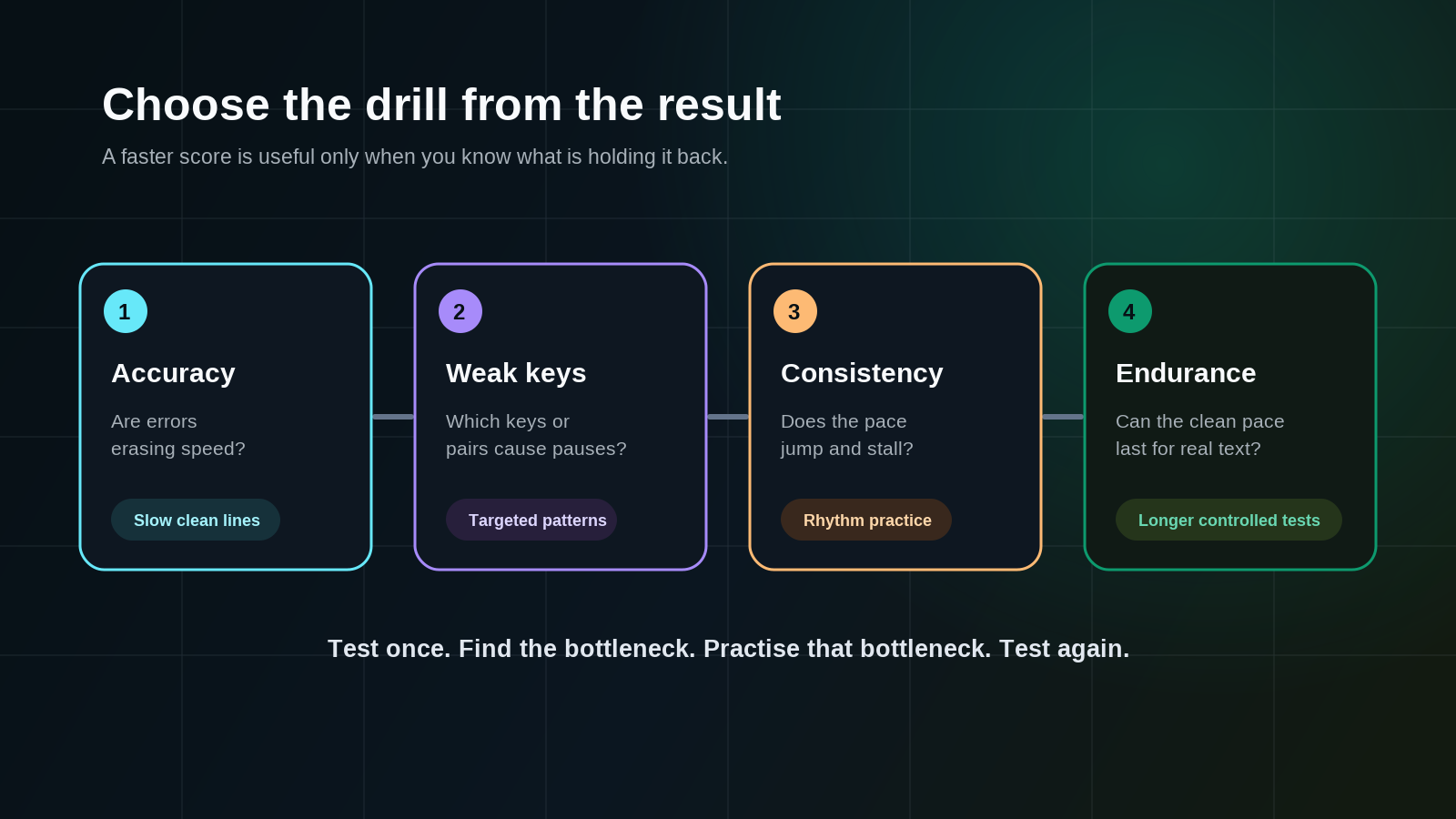
To type faster, take one honest baseline test and find the main limit. Fix accuracy if errors erase your pace. Drill weak keys if a few patterns cause pauses. Train rhythm if your speed jumps around. Use longer tests if your clean pace fades. Retest with the same settings.
- A slower clean run can be more useful than a fast run full of corrections.
- Different limits need different drills. One routine does not fit every score.
- Compare tests with the same duration, text type, language, and settings.
Free Keytopia typing test
Take a typing test before choosing your next drill
See average, raw, peak, and low WPM alongside accuracy, consistency, word speed, rhythm, and your performance timeline.
- PaceAverage, raw, peak and low WPM
- ControlAccuracy, errors, consistency and CPM
- TimingReaction, overlap, hold, rhythm and recovery
- PatternsTimeline, heatmap, word, key and bigram speed
No account needed. Save your history after sign-in.
Start with one honest baseline
Choose a test you can repeat. A one-minute test is useful for a quick baseline. A three-minute test is better when you also want to see rhythm and fatigue.
Keep the text type, language, punctuation setting, and duration the same. Take the test once after a short warm-up. Record WPM, accuracy, consistency, and the keys that caused trouble.
Do not keep restarting until you get a lucky passage. A personal best is fun, but it is not a diagnosis. You need a normal result that shows how you type on an ordinary day.
Fix accuracy when mistakes erase speed
Look at the gap between raw pace and usable pace. If your hands move quickly but the final score falls because of errors, more speed practice will make the gap wider.
Slow down enough to notice the wrong movement. Practise short lines at a pace you can control. When you miss a word, fix it calmly. Then repeat the difficult word or letter pair once.
Do not chase perfect accuracy in every session. The goal is a stable floor. Once clean typing feels normal, add brief faster blocks and return to a calm pace.
Target weak keys and letter pairs
A full typing test can hide a small problem. You may lose most of your time on two letters, a common bigram, the number row, or punctuation.
Use your result details to find the repeated pause. Build a short drill around that pattern. If T and H feel slow together, practise words such as the, this, that, with, and other. If capitals break rhythm, practise short names and sentence starts. If commas cause errors, use real sentences with commas.
Targeted work should be short. Five focused minutes is enough to give the weak pattern a clear signal. Finish with a normal test to check whether the fix transfers.
Train rhythm when the pace jumps around
Fast typing is not a string of tiny sprints. It is a steady flow with small changes for difficult words.
If the speed graph rises and falls sharply, stop trying to attack each word. Read a little ahead. Keep a light pace through common words. Let difficult words take the time they need.
Try two calm minutes, twenty seconds above your normal pace, then one calm minute. The faster block shows your hands a higher rhythm. The calm block checks whether your form survived.
Build endurance for real work and exams
A short test can hide tension. Your shoulders may rise after two minutes. Accuracy may drop when the passage gets longer. Your backspace use may increase as you get tired.
Add one longer test each week. Keep the pace below your short-test maximum. Focus on relaxed hands, easy breathing, and a steady return after mistakes.
If you are preparing for an exam or job test, copy its official duration and text style. A fast score on a short word list does not prove that you can sustain the same pace on a ten-minute passage.
Use a weekly plan that changes with the data
A simple week can look like this:
- Take one baseline and choose the main limit.
- Spend two sessions on that limit.
- Add one short speed session.
- Add one longer controlled session.
- Retest with the original settings.
Keep the next goal small. It can be fewer corrections, a steadier graph, cleaner punctuation, or a small WPM increase at the same accuracy.
Keytopia can support this loop. Start with a guest test, review the result, and choose the next mode from the evidence instead of guessing.
FAQs
How can I increase my typing speed quickly?
Fix the clearest limit first. A weak pattern can improve quickly when you isolate it, but lasting speed still needs repeated clean practice.
Should I always practise at my maximum speed?
No. Use short fast blocks for speed exposure. Keep most practice controlled enough that mistakes do not become the main habit.
How often should I retest my WPM?
Once or twice a week is enough for most learners. Daily tests are fine when they are part of practice, but do not treat every run as a final judgment.
Sources
Independent research, official documentation, and source pages behind the claims above.
- Aalto University, observations from 136 million keystrokeshttps://userinterfaces.aalto.fi/136Mkeystrokes/resources/chi-18-analysis.pdf
- University of Cambridge, traits of fast typistshttps://www.cam.ac.uk/research/news/what-makes-a-faster-typist
Related Keytopia resources
Product pages and related guides from Keytopia. These are not independent evidence.
Key takeaway
Typing gets faster when practice matches the real limit. Test once, find the bottleneck, train it, and retest under the same conditions.
Free Keytopia typing test
Take a typing test before choosing your next drill
See average, raw, peak, and low WPM alongside accuracy, consistency, word speed, rhythm, and your performance timeline.
No account needed. Save your history after sign-in.
- PaceAverage, raw, peak and low WPM
- ControlAccuracy, errors, consistency and CPM
- TimingReaction, overlap, hold, rhythm and recovery
- PatternsTimeline, heatmap, word, key and bigram speed