
To approach 100 WPM, keep accuracy stable and reduce small delays. Practise common word chunks, read ahead, use short speed exposure, and build longer-test endurance. Compare the same test type every time. A short personal best is not the same as a repeatable 100 WPM.
- Advanced gains come from smaller delays, not harder key presses.
- Word chunks and reading ahead help the hands prepare before the next word.
- Longer tests reveal whether speed is controlled or only a sprint.
Free Keytopia typing test
Take a typing test before choosing your next drill
See average, raw, peak, and low WPM alongside accuracy, consistency, word speed, rhythm, and your performance timeline.
- PaceAverage, raw, peak and low WPM
- ControlAccuracy, errors, consistency and CPM
- TimingReaction, overlap, hold, rhythm and recovery
- PatternsTimeline, heatmap, word, key and bigram speed
No account needed. Save your history after sign-in.
Define what 100 WPM means for you
Choose the duration and text type before you set the goal.
One hundred WPM on a short common-word test is different from 100 WPM on a five-minute quote with punctuation. Both can be valid. They are not interchangeable.
Use one main benchmark and one transfer test. The benchmark tracks the skill. The transfer test shows whether it helps with realistic text.
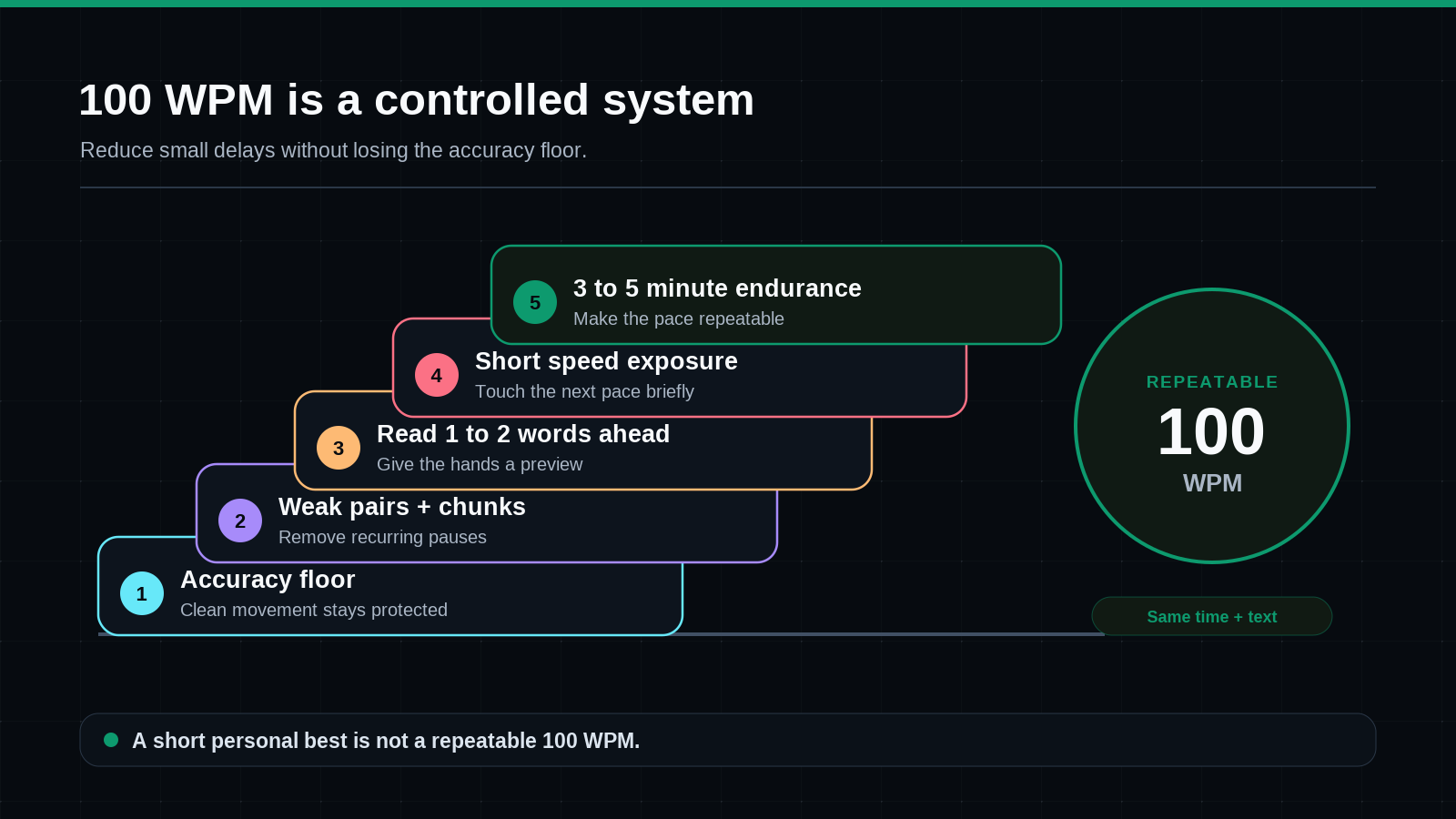
Protect the accuracy floor
At higher speeds, one hesitation can cause several rushed corrections.
Keep most practice at a pace where the movement stays clean. Use brief fast blocks to expose the next limit. Return to normal pace and check whether accuracy recovers.
If raw pace rises while final WPM stays flat, mistakes are cancelling the gain. Fix the repeated error before adding more speed.
Practise chunks instead of isolated letters
Fluent typing often feels like short patterns: tion, ing, the, with, for the, and common endings.
Use your slow bigrams and trigrams to build drills. Put the pattern inside real words and short phrases. Random repetition can teach the movement. Real words teach the movement in context.
Do not guess which pairs are weak when result data can show them.
Read ahead without racing the eyes
The hands cannot prepare for a word the eyes have not read.
Use text that is easy enough to preview one or two words ahead. Keep the eyes on the upcoming phrase while the hands finish the current word.
This takes calm practice. If the eyes jump too far, accuracy can fall. Start with common text and a comfortable pace.
Build the long version of the skill
Add three-minute and five-minute tests. Watch where the pace falls. It may be punctuation, long words, concentration, or tension.
Use relaxed hands and small key presses. Take breaks between long runs. Do not turn endurance work into repeated strain.
A repeatable advanced score should survive more than one passage.
Use a two-speed week
Alternate controlled and fast work.
- Two sessions for weak patterns and clean rhythm.
- One session with short speed exposure.
- One longer session for endurance.
- One comparable benchmark.
Leave room for rest. More tests are not always more learning.
Read an advanced result as a system
Do not judge a fast run from final WPM alone. Read the pace, control, timing, and pattern data together.
Consider this example result:
- Final speed: 82 WPM
- Raw speed: 91 WPM
- Average timeline speed: 84 WPM
- Peak speed: 109 WPM
- Low speed: 63 WPM
- Accuracy: 94 percent
- Consistency: 71 percent
- Corrections: 18
The peak proves that the typist can move above 100 WPM for a short period. The final score shows that the pace does not survive the full test. The raw and final gap points to error cost. The wide peak-to-low range points to uneven rhythm or difficult patterns.
Use this decision guide:
- High peak, low final WPM, and many errors: protect accuracy before adding speed.
- High peak, good accuracy, and low consistency: practise even pacing and reading ahead.
- Stable timeline with weak final WPM: improve common word chunks and reduce small pauses.
- Strong one-minute result with a late timeline drop: add controlled three-minute and five-minute tests.
This is why a single score cannot choose the next drill. The result needs a diagnosis first.
Use per-key speed and bigrams to remove small delays
At advanced speeds, a few slow transitions can limit the whole run. Keytopia reports per-key speed and the fastest and slowest letter pairs. Use that evidence to build a narrow drill.
Suppose the slowest pairs are ct, br, and io. Do not type those pairs in isolation for twenty minutes. Use a short transfer sequence:
- Type each pair inside five common words. For ct, use action, active, section, practice, and direct.
- Type two short sentences that contain several target words.
- Type a normal paragraph for one minute.
- Check the pair data and the performance timeline again.
Keep the drill only when the pair becomes faster in normal text. A drill record does not matter if the pause returns in a paragraph.
Also check the keyboard heatmap. One slow key can affect several pairs. If T is slow by itself, work on the T movement before treating every T pair as a separate problem. If the key is normal but one pair is slow, practise the transition between the two fingers.
Use light key presses. Faster timing should come from earlier preparation and a shorter path. It should not come from hitting the keys harder.
Run one focused 100 WPM session
A useful advanced session has a test, a drill, and a transfer check. It does not need many personal-best attempts.
Try this 24-minute session:
- Warm up for three minutes at a relaxed pace.
- Take one one-minute baseline with your normal benchmark settings.
- Review the raw gap, accuracy, consistency, timeline, heatmap, and slow bigrams.
- Spend six minutes on the clearest weak pattern.
- Type four 20-second fast blocks. Rest for 40 seconds after each block.
- Type one controlled three-minute passage.
- Retake the one-minute benchmark once.
Compare the two one-minute tests. A useful change may be a smaller raw gap, fewer errors, a higher low WPM, or a steadier timeline. The final WPM does not need to rise in every session.
Stop the speed blocks when accuracy collapses or the hands become tense. Fast exposure should show the next rhythm. It should not teach rushed movement. Keep the three-minute passage below your sprint pace so it trains control and endurance.
FAQs
Can everyone reach 100 WPM?
People differ in experience, goals, movement, and available practice. Treat 100 WPM as an optional target, not a requirement for good typing.
Should I use very short tests to train speed?
Short tests are useful for speed exposure. Use longer tests as well so the result does not become only a sprint skill.
What accuracy should I keep at 100 WPM?
Use the accuracy required by your real task or test. During practice, watch whether faster raw pace is being erased by corrections.
Which Keytopia result number should I improve first for 100 WPM?
Start with the number that explains the lost pace. A large raw gap points to errors. Low consistency points to uneven rhythm. A late timeline drop points to endurance. Slow keys and bigrams point to specific movement delays.
Sources
Independent research, official documentation, and source pages behind the claims above.
Key takeaway
A useful 100 WPM is accurate, repeatable, and tied to a clear test format. Reduce delays, train chunks, read ahead, and build endurance.
Free Keytopia typing test
Take a typing test before choosing your next drill
See average, raw, peak, and low WPM alongside accuracy, consistency, word speed, rhythm, and your performance timeline.
No account needed. Save your history after sign-in.
- PaceAverage, raw, peak and low WPM
- ControlAccuracy, errors, consistency and CPM
- TimingReaction, overlap, hold, rhythm and recovery
- PatternsTimeline, heatmap, word, key and bigram speed