
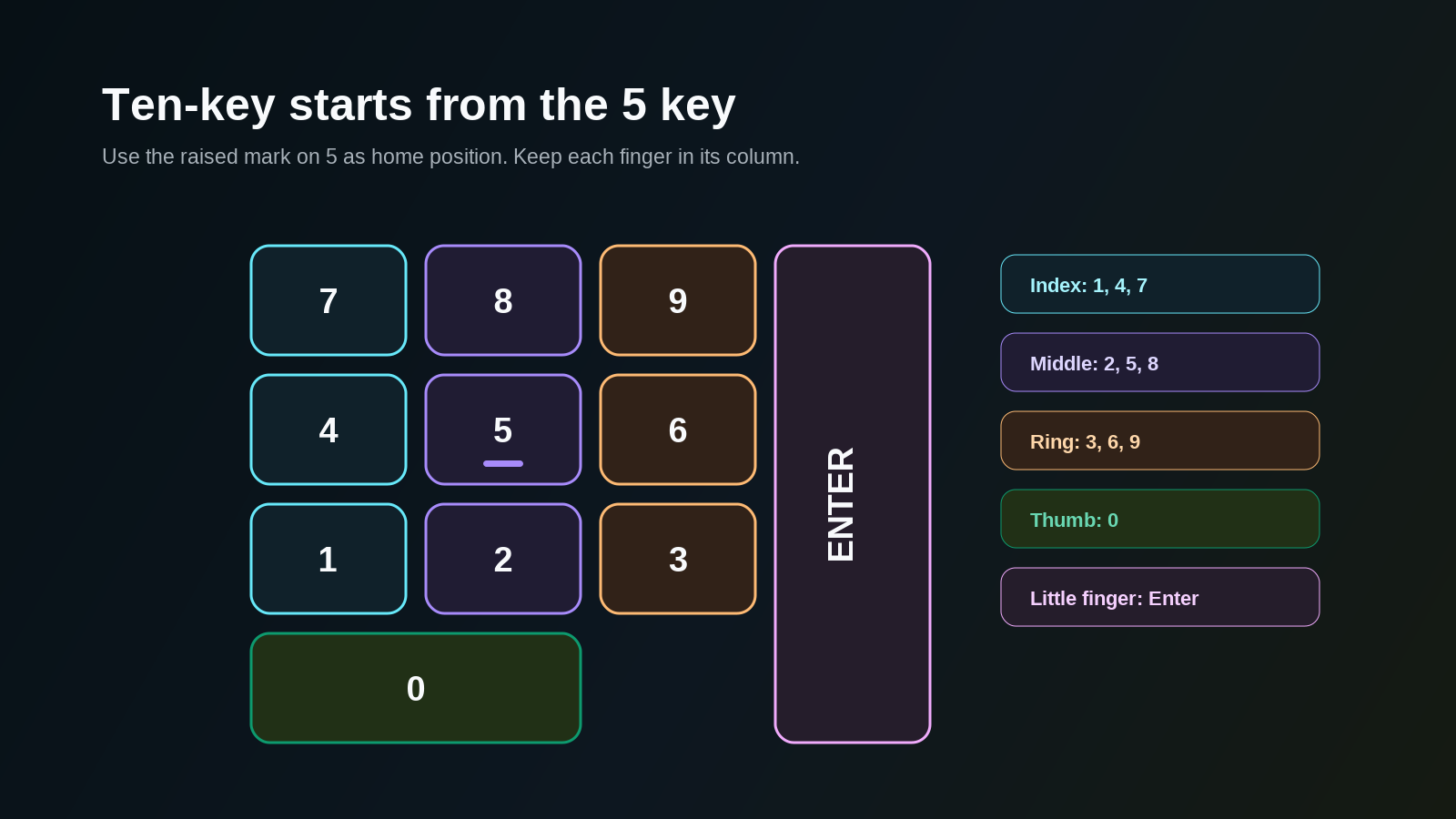
Start ten-key practice with the middle finger on 5. Keep the index finger in the 1-4-7 column, the middle finger in 2-5-8, the ring finger in 3-6-9, and the thumb on 0. Practise clean groups before timed entry. Match any job test to its exact rules.
- The raised mark on 5 is the numeric keypad home position.
- Accuracy matters because one wrong digit can change a value completely.
- Job tests may report KPH, KDPH, accuracy, or a custom score. Read the rules.
Free Keytopia typing test
Take a general typing baseline before a dedicated ten-key test
Keytopia can measure standard typing control and number-row patterns. It does not currently report numpad KPH or verify ten-key field accuracy.
- PaceAverage, raw, peak and low WPM
- ControlAccuracy, errors, consistency and CPM
- TimingReaction, overlap, hold, rhythm and recovery
- PatternsTimeline, heatmap, word, key and bigram speed
No account needed. Save your history after sign-in.
Learn the ten-key home position
Place the middle finger on 5. Use the raised mark to find it without looking.
The index finger covers 1, 4, and 7. The middle finger covers 2, 5, and 8. The ring finger covers 3, 6, and 9. The thumb handles 0. The little finger can handle Enter.
This is a common starting map. Adapt it when your keypad, hand movement, or accessibility needs require another safe method.
Build accuracy with small groups
Start with vertical groups: 147, 258, and 369. Then use rows: 123, 456, and 789. Add 0 and Enter after the columns feel stable.
Practise realistic groups such as dates, prices, invoice numbers, quantities, and account codes. Do not use real private data.
Say the group silently before you type it. This helps the eyes read the complete value instead of reacting to one digit at a time.
Add decimal points and operators carefully
Different jobs use different keys. Finance work may need decimal points. Spreadsheets may need plus, minus, and Enter. Some tests use digits only.
Add one new key to a stable pattern. Do not mix every operator into the first session.
Check whether Num Lock changes the keypad on your device. Laptop keypads and compact keyboards may use a layer instead of dedicated keys.
Read a job test before you copy it
Ten-key tests may report keystrokes per hour, key depressions per hour, accuracy, or a platform-specific score.
Check the duration, allowed corrections, decimal handling, source format, and required keyboard. Some work involves reading from paper. Other work displays data on screen.
Practise the real format. A general WPM test is not a replacement for numeric entry.
10-key KPH targets and how sure each number is
Ten-key results are usually reported in keystrokes per hour. The table separates figures that come from an official document from figures that are only common talk.
| Figure | Value | How sure |
|---|---|---|
| Gross KPH formula | Accepted keystrokes divided by minutes, multiplied by 60 | Arithmetic |
| 2,000 keystrokes in 15 minutes | 8,000 KPH | Arithmetic |
| 2,500 keystrokes in 15 minutes | 10,000 KPH | Arithmetic |
| SSC DEO skill test, Part B | 8,000 key depressions per hour over 15 minutes | SSC CHSL 2025 notice |
| SSC DEO skill test, Part A | 15,000 key depressions per hour over 15 minutes | SSC CHSL 2025 notice |
| A typical data-entry job posting | Often quoted somewhere between 8,000 and 10,000 KPH | Unverified; the posting is the only figure that counts |
| Accuracy in a field test | Many tests fail the whole field on one wrong digit | Check the test rules |
| Keytopia numpad test | Not offered today | Keytopia |
Do not convert a five-character WPM score into KPH for a job claim unless the employer states that convention.
Numpad finger map
The standard map keeps each finger in one column. It is the same map the first section describes, laid out as a table you can print.
| Finger | Home key | Keys it covers |
|---|---|---|
| Index finger | 4 | 1, 4, 7 |
| Middle finger | 5 | 2, 5, 8 |
| Ring finger | 6 | 3, 6, 9 |
| Thumb | 0 | 0 |
| Little finger | Enter | Enter, and often plus |
| Ring or little finger | Decimal point, depending on the keypad |
The decimal point and the operator keys vary between keypads, so settle on one safe finger and keep it. If hand size, mobility, or a compact keypad makes a column awkward, change the map once and then stay consistent.
A two-week 10-key drill plan
Fourteen days of ten minutes is enough to make the columns automatic. Keep every session under a timer only on the days marked.
| Days | Drill | Timed? | Goal |
|---|---|---|---|
| 1 to 3 | Columns 147, 258, 369, then rows 123, 456, 789 | No | Find 5 by touch, eyes off the keypad |
| 4 to 5 | Add 0 and Enter; one value per line | No | Clean rows with no misses |
| 6 to 7 | Made-up whole numbers in groups of four | Last two minutes | A clean timed block |
| 8 to 9 | Decimals and money amounts | Last two minutes | No missed decimal points |
| 10 to 11 | Dates and codes, read from paper | Last two minutes | Verify every value against the source |
| 12 to 13 | Mixed blocks in the format your test uses | Yes | Record fields, errors, and time |
| 14 | One full-length mock under the test's rules | Yes | A score with its error rule written beside it |
Number-row work on a normal keyboard helps too; the number and symbol practice guide covers it.
Use a simple practice session
Try this ten-minute session:
- Two minutes of column patterns.
- Three minutes of realistic number groups.
- Two minutes with decimal points or the keys your work needs.
- One timed test.
- Review the repeated error and type that pattern again.
Stop when accuracy drops from fatigue. Numbers reward careful repetition.
Understand KPH before comparing ten-key scores
Numeric-entry tests may report keystrokes per hour, KPH, KSPH, or a score defined by the employer. The labels do not guarantee the same error rule.
A simple gross KPH conversion is:
accepted keystrokes divided by test minutes, multiplied by 60.
For example, 2,000 accepted keystrokes in 15 minutes equals 8,000 KPH:
2,000 ÷ 15 × 60 = 8,000.
That example does not include an error penalty. A test may reject an entire field, subtract incorrect keystrokes, count corrected errors, or require a separate accuracy rate. Read the instructions before using the number. Do not convert a normal five-character WPM result into a ten-key claim unless the test owner explicitly uses that convention.
Build a practice sheet that resembles data-entry work
Random digits teach key location, but real fields teach reading and verification. Use made-up data, never private customer or account information.
Create four short blocks:
- Whole numbers: 4817, 92054, 3076.
- Decimals and money: 18.40, 275.09, 6.75.
- Dates and codes: 2026-07-26, 004182, 73-109.
- Rows with Enter: one value per line, as in a form or spreadsheet.
Type each block without a timer first. Compare every value with the source. Then time one block. Record total fields, incorrect fields, corrected fields, and elapsed time. A repeated digit reversal needs a reading drill. A missed decimal needs a precision drill. A slow column may need a finger-placement drill.
Know the current Keytopia limit for numpad testing
Keytopia does not currently provide a dedicated numeric-keypad or ten-key test. A normal guest typing result cannot verify ten-key KPH, field accuracy, or numpad finger control.
Use Keytopia for the practice modes it actually provides. General number and symbol work can support number-row control. It is not a substitute for a dedicated numpad test.
If an employer names a platform, duration, source format, or scoring rule, use that exact setup for the final mocks. If the test is not specified, choose a dedicated ten-key tool that reports its formula and error handling. Keep the same keyboard and Num Lock state across comparisons.
FAQs
What is the home key on a numeric keypad?
The 5 key is the home position. It usually has a raised mark that the middle finger can find by touch.
Is ten-key speed measured in WPM?
Often it is measured in keystrokes or key depressions per hour, but employers and test platforms can use different rules.
Can I practise ten-key on a laptop?
Yes if the laptop has a keypad or a numeric layer. A separate USB keypad can provide the standard physical layout.
Can a normal WPM test prove ten-key speed?
No. A text WPM test and a numeric-entry test measure different input. Use the requested KPH, field-accuracy, duration, and correction rules.
Sources
Independent research, official documentation, and source pages behind the claims above.
- SSC CHSL 2025 official notice showing WPM and KDPH conversionhttps://ssc.gov.in/api/attachment/uploads/masterData/NoticeBoards/Notice_of_adv_chsl_2025.pdf?mode=light
- O*NET, Data Entry Keyers work activities and taskshttps://www.onetonline.org/link/summary/43-9021.00
Related Keytopia resources
Product pages and related guides from Keytopia. These are not independent evidence.
Key takeaway
Ten-key speed starts with a reliable home position and clean columns. Match timed practice to the real data-entry test.
Free Keytopia typing test
Take a general typing baseline before a dedicated ten-key test
Keytopia can measure standard typing control and number-row patterns. It does not currently report numpad KPH or verify ten-key field accuracy.
No account needed. Save your history after sign-in.
- PaceAverage, raw, peak and low WPM
- ControlAccuracy, errors, consistency and CPM
- TimingReaction, overlap, hold, rhythm and recovery
- PatternsTimeline, heatmap, word, key and bigram speed