
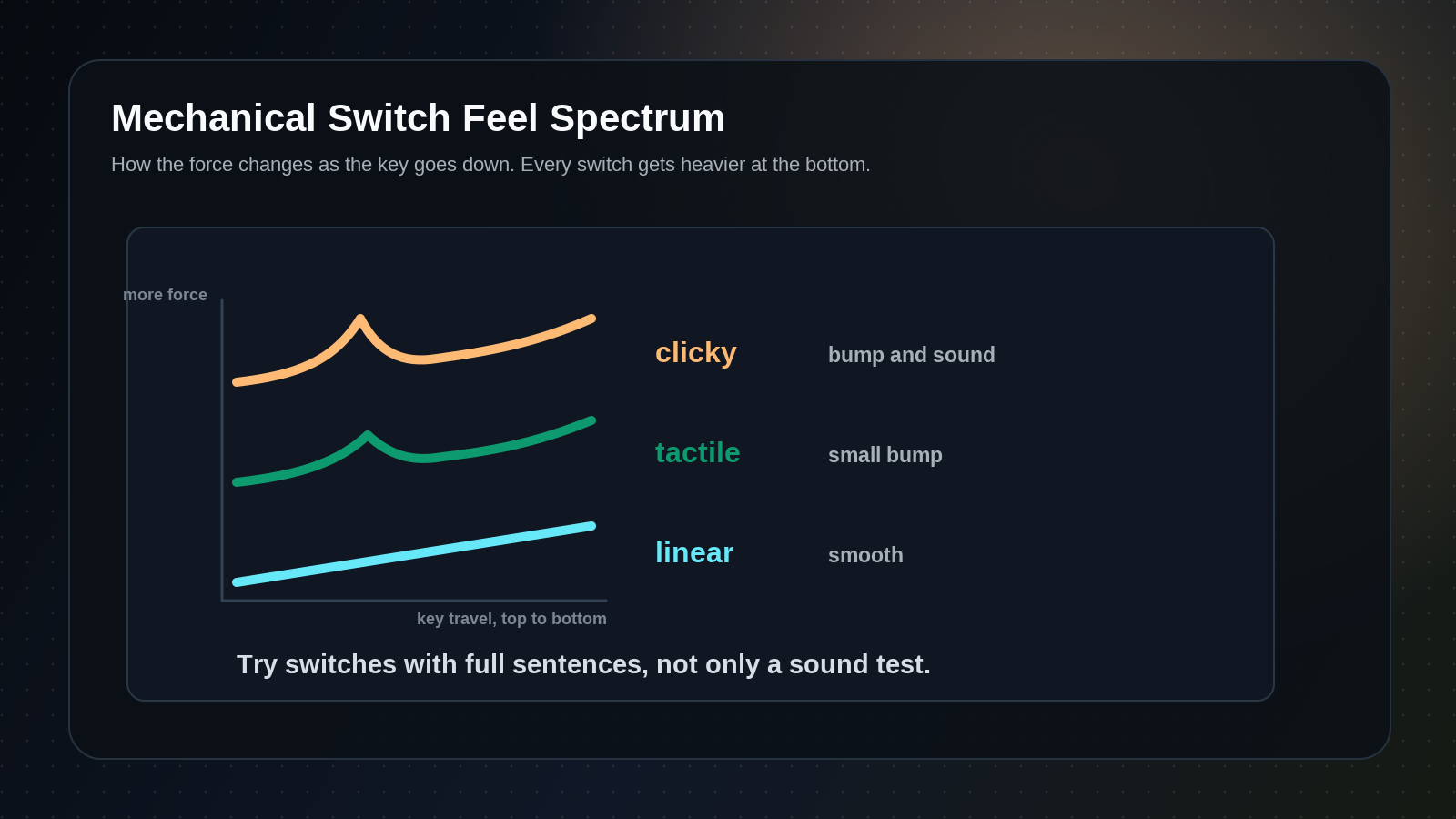
Linear switches feel smooth, tactile switches add a bump, and clicky switches add sound plus feedback. Choose by full-text feel, noise, access needs, and repeated accuracy rather than assuming one switch is universally fastest.
- Linear, tactile, and clicky switches train different preferences, not different skill levels.
- Noise matters if you share a room, office, classroom, or microphone.
- A switch tester or short trial can save you from buying the wrong feel.
Free Keytopia typing test
Test your setup before you change it
Run the same test before and after a change. Compare errors, rhythm, reaction time, key overlap, and hold time.
- PaceAverage, raw, peak and low WPM
- ControlAccuracy, errors, consistency and CPM
- TimingReaction, overlap, hold, rhythm and recovery
- PatternsTimeline, heatmap, word, key and bigram speed
No account needed. Save your history after sign-in.
The three basic switch feels
Linear switches move smoothly from top to bottom. There is no bump telling you when the key actuates.
Tactile switches have a small bump. Many typists like that because it gives feedback without always being loud.
Clicky switches have a bump and a click sound. They can feel satisfying, but they can be too noisy for shared spaces.
Pros and cons of linear switches
Pros: smooth, often quiet compared with clicky switches, popular for gaming, easy to press quickly.
Cons: less feedback, easier to press by accident for some typists, may encourage bottoming out if you type heavily.
Choose linear if you like a smooth keypress and can keep accuracy high without tactile feedback.
Pros and cons of tactile switches
Pros: clear feedback, often good for typing, less noisy than clicky switches, helpful if you want to feel the actuation point.
Cons: the bump can feel scratchy or distracting on some switches, and not every tactile switch feels the same.
Choose tactile if you want feedback without turning your keyboard into a room announcement.
Pros and cons of clicky switches
Pros: strong feedback, satisfying sound for some people, easy to know when a keypress registered.
Cons: loud, distracting in offices or calls, not ideal for shared bedrooms, classrooms, or microphones.
Choose clicky only if your environment can handle the sound and you truly enjoy it.
Light vs heavy switches
Light switches can feel fast and gentle. The risk is accidental presses.
Heavy switches can feel controlled. Some users find higher force tiring during long sessions.
There is no perfect force for everyone. Test full paragraphs before buying. If typing causes pain, stop and seek qualified advice rather than treating switch force as a medical solution.
Silent switches and office typing
Silent switches reduce sound, but they are not always silent.
Desk material, keycaps, case design, stabilizers, and how hard you type all affect noise.
If you type near other people, choose quiet switches and practice lighter keypresses. A quiet switch cannot fix heavy slamming by itself.
Test switches with real text
Do not judge a switch only by pressing one key.
Type a paragraph. Type punctuation. Type numbers. Type code if you code.
Then check your accuracy on Keytopia. A switch that feels fun but makes you miss more keys is not helping your typing practice.
Switches change feel more than they change skill
Linear, tactile, and clicky switches can all be good for typing. None of them automatically makes someone accurate.
Linear switches feel smooth and can be quiet, but some learners press them too hard because there is no bump. Tactile switches give a small signal before actuation, which some typists like for control. Clicky switches add sound, which can feel satisfying but may be too loud for shared spaces.
The important question is not "which switch is best?" It is "which switch lets me type lightly, accurately, and comfortably for the kind of work I do?"
Skill still comes from repetition. The switch just changes the feedback you receive while repeating.
Test before you rebuild your whole setup
If you are curious about switches, try a switch tester or borrow a keyboard before buying a full board.
Type a paragraph, not just one key. Some switches feel great for ten taps and tiring after five minutes. Others feel plain at first and excellent during real work.
Pay attention to fatigue, accidental presses, sound, and whether your accuracy changes after the novelty fades.
Then take a normal Keytopia test on your current keyboard and on the new one. If the new keyboard feels better and your accuracy holds, good. If it only sounds nicer, that may still be worth it as a hobby, but it is not a typing improvement by itself.
FAQs
Are tactile switches better for typing?
Many typists like tactile switches because the bump gives feedback, but they are not automatically better. Some people type best on linear or low-profile switches.
Are clicky switches bad for typing?
No. They can feel great. The problem is noise. They are usually a poor fit for shared offices, classrooms, calls, or late-night typing near other people.
Are linear switches only for gaming?
No. Many people type well on linear switches. They just provide less tactile feedback, so accuracy depends more on your own control.
Should I buy a switch tester?
It can help you learn the basic feel, but it is not the same as typing a full paragraph. Use it as a first filter, not a final decision.
Sources
Independent research, official documentation, and source pages behind the claims above.
Key takeaway
For typing, the best switch is the one that keeps your hands relaxed, your accuracy high, and your environment sane. Feel matters, but practice still matters more.
Free Keytopia typing test
Test your setup before you change it
Run the same test before and after a change. Compare errors, rhythm, reaction time, key overlap, and hold time.
No account needed. Save your history after sign-in.
- PaceAverage, raw, peak and low WPM
- ControlAccuracy, errors, consistency and CPM
- TimingReaction, overlap, hold, rhythm and recovery
- PatternsTimeline, heatmap, word, key and bigram speed