
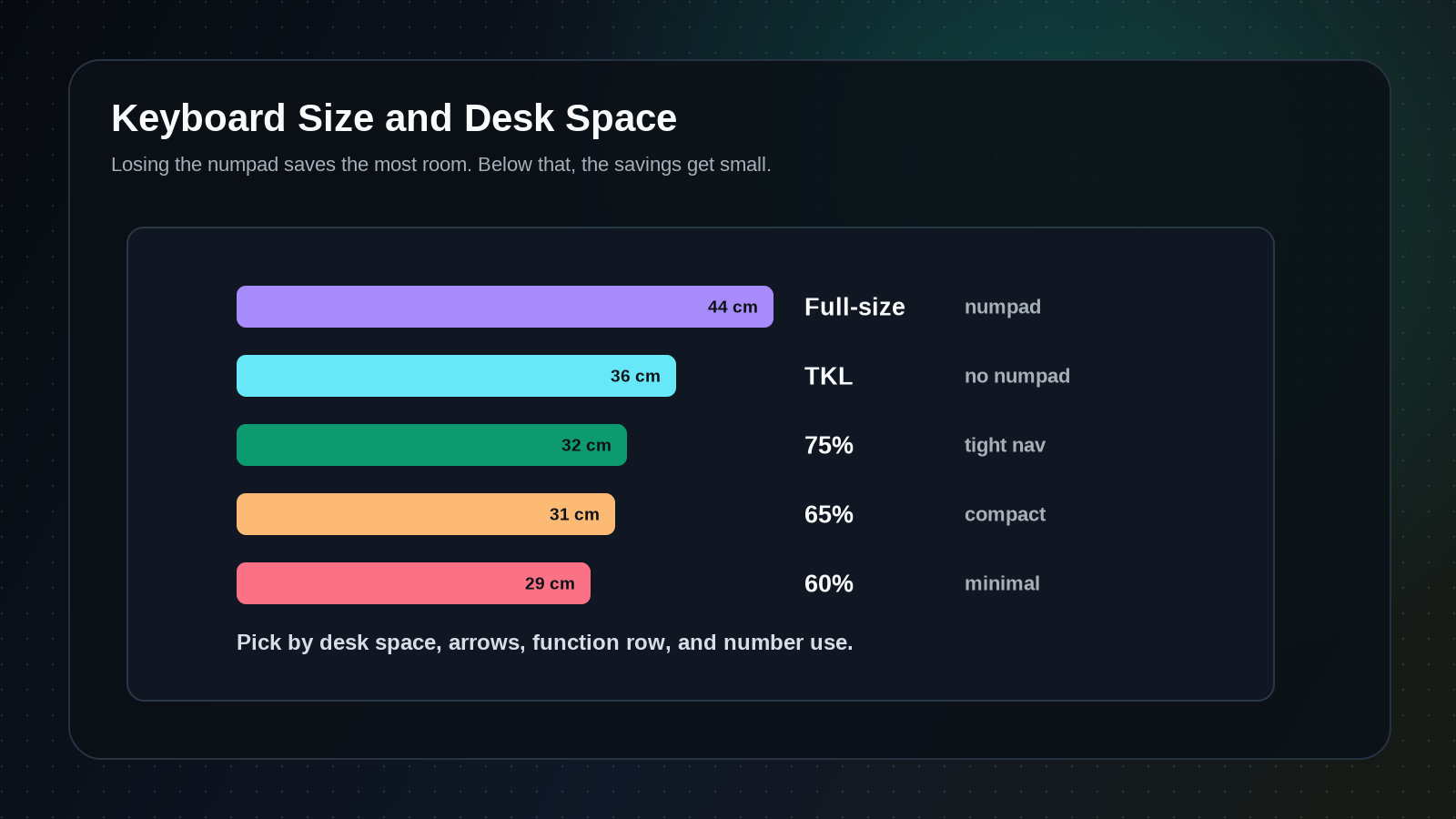
Choose full-size if you need a numpad and TKL if you want arrows and a function row with more mouse space. Go 75% for a compact daily driver, 65% if you can live without the function row, and 60% only if you are happy using layers.
- Smaller keyboards save space but move keys into layers.
- Bigger keyboards are easier to understand but can push the mouse farther away.
- The best size depends on your real work, not the cleanest desk photo.
Free Keytopia typing test
Test your setup before you change it
Run the same test before and after a change. Compare errors, rhythm, reaction time, key overlap, and hold time.
- PaceAverage, raw, peak and low WPM
- ControlAccuracy, errors, consistency and CPM
- TimingReaction, overlap, hold, rhythm and recovery
- PatternsTimeline, heatmap, word, key and bigram speed
No account needed. Save your history after sign-in.
Full-size keyboards
Full-size keyboards include letters, function row, arrows, navigation cluster, and numpad.
Pros: easiest to understand, best for data entry, useful for spreadsheets, familiar in offices.
Cons: wide, pushes the mouse farther away, can increase shoulder reach on small desks.
Pick full-size if you type lots of numbers or prefer having every key visible.
TKL keyboards
TKL means tenkeyless. It removes the numpad but keeps arrows, navigation keys, and function row.
Pros: more mouse space, still easy to use, great for many writers, programmers, students, and gamers.
Cons: no numpad, so it is weaker for heavy number entry.
Pick TKL if you want a safe smaller board without learning many layers.
75% keyboards
A 75% keyboard keeps many common keys but packs them closer together.
Pros: compact, usually keeps function row and arrows, good desk fit.
Cons: cramped layout can take adjustment, key placement varies by model.
Pick 75% if you want a compact board but still use function keys and arrows often.
65% keyboards
A 65% keyboard usually keeps arrows but removes the function row and some navigation keys.
Pros: small, clean, portable, keeps arrows.
Cons: more layer use, less convenient for people who need function keys often.
Pick 65% if you value desk space and can learn a few shortcuts.
60% keyboards
A 60% keyboard removes arrows, function row, numpad, and many navigation keys from the main layer.
Pros: tiny footprint, portable, keeps mouse close, popular with people who like layers.
Cons: frustrating if you need arrows, F keys, Delete, Home, End, or numbers often.
Pick 60% only if you are ready to learn layers and your work does not depend on visible navigation keys.
How size affects typing practice
Keyboard size does not directly create typing speed.
It changes comfort, reach, shortcuts, and how often you need layers.
If a compact board makes you pause to find basic keys, it may slow practice. If a smaller board keeps your mouse closer and your shoulders relaxed, it may help daily comfort.
Test the size on Keytopia
After switching keyboard size, run the same Keytopia practice sessions for a few days.
Check WPM, accuracy, consistency, punctuation, numbers, and code if you code.
The best keyboard size is the one that supports your real routine, not the one that looks most impressive online.
Choose size by workflow, not desk aesthetics
Small keyboards look clean, but missing keys are not free.
A 60 percent keyboard saves space but pushes arrows, function keys, navigation, and sometimes punctuation into layers. That can be fine if you enjoy layers or mostly type plain text. It can be annoying if you edit documents, work in spreadsheets, use function keys, or rely on dedicated arrows.
A TKL or 75 percent board is often a good middle: enough desk space for the mouse, but still enough dedicated keys for editing. Full-size is still useful for numeric entry, finance, data work, and anyone who lives on the numpad.
The right size is the one that removes friction from your real tasks.
Practice the keys your size hides
Compact keyboards ask you to memorize layers. That is not bad, but it is a skill.
If your board hides arrows, Home, End, Delete, function keys, or symbols behind Fn layers, practice those deliberately. Otherwise, your typing may be fast until the moment you need to edit.
Create a few custom practice lines with the shortcuts and layer keys you actually use. For example: select a word, jump to line end, delete a word, open search, rename a file.
A compact board becomes powerful when the hidden keys are as familiar as the visible ones.
FAQs
Is a 60% keyboard good for typing?
It can be, but it is not ideal for everyone. If you need arrows, function keys, or navigation keys often, a 60% board may slow you down until layers feel natural.
Is TKL better than full-size?
Choose TKL if you want more desk space and do not need a numpad. Choose full-size when dedicated number entry matters.
What keyboard size is best for programmers?
Many programmers like TKL, 75%, or 65% boards. The best choice depends on how often you use function keys, arrows, symbols, and shortcuts.
Do smaller keyboards make you faster?
Not automatically. They can improve desk comfort, but layers can slow you down if you have not learned them.
Sources
Independent research, official documentation, and source pages behind the claims above.
Key takeaway
Keyboard size is a workflow choice. Full-size helps number-heavy work. TKL and 75% are safe daily options. 65% and 60% are great only if you are comfortable with layers.
Free Keytopia typing test
Test your setup before you change it
Run the same test before and after a change. Compare errors, rhythm, reaction time, key overlap, and hold time.
No account needed. Save your history after sign-in.
- PaceAverage, raw, peak and low WPM
- ControlAccuracy, errors, consistency and CPM
- TimingReaction, overlap, hold, rhythm and recovery
- PatternsTimeline, heatmap, word, key and bigram speed