
Ten minutes is a convenient starting format, not a proven dose. Try two minutes of warm-up, three minutes of accuracy work, two minutes on one weak pattern, two minutes of relevant text, and one minute to record what to practise next.
- Short daily practice is easier to keep than rare long sessions.
- The routine should include accuracy, weak spots, and real text.
- A tiny reflection at the end helps you pick tomorrow’s focus.
Free Keytopia typing test
Take a typing test and set an honest starting point
A clean baseline shows your WPM, accuracy, errors, consistency, and the keys that need attention first.
- PaceAverage, raw, peak and low WPM
- ControlAccuracy, errors, consistency and CPM
- TimingReaction, overlap, hold, rhythm and recovery
- PatternsTimeline, heatmap, word, key and bigram speed
No account needed. Save your history after sign-in.
Why 10 minutes can be a useful starting format
Long sessions sound impressive. They are also easy to avoid.
Ten minutes is small enough for many people to repeat, and repetition is the point. It is not enough for every goal or every learner.
Your hands do not need drama. They need clean reps, regular feedback, and enough variety to stay interested.
Minute 1 and 2: warm up
Start easy.
Use common words, home-row patterns, or a short sentence. Keep your shoulders relaxed and your eyes on the screen.
The warm-up is not about speed. It tells your hands that practice has started.
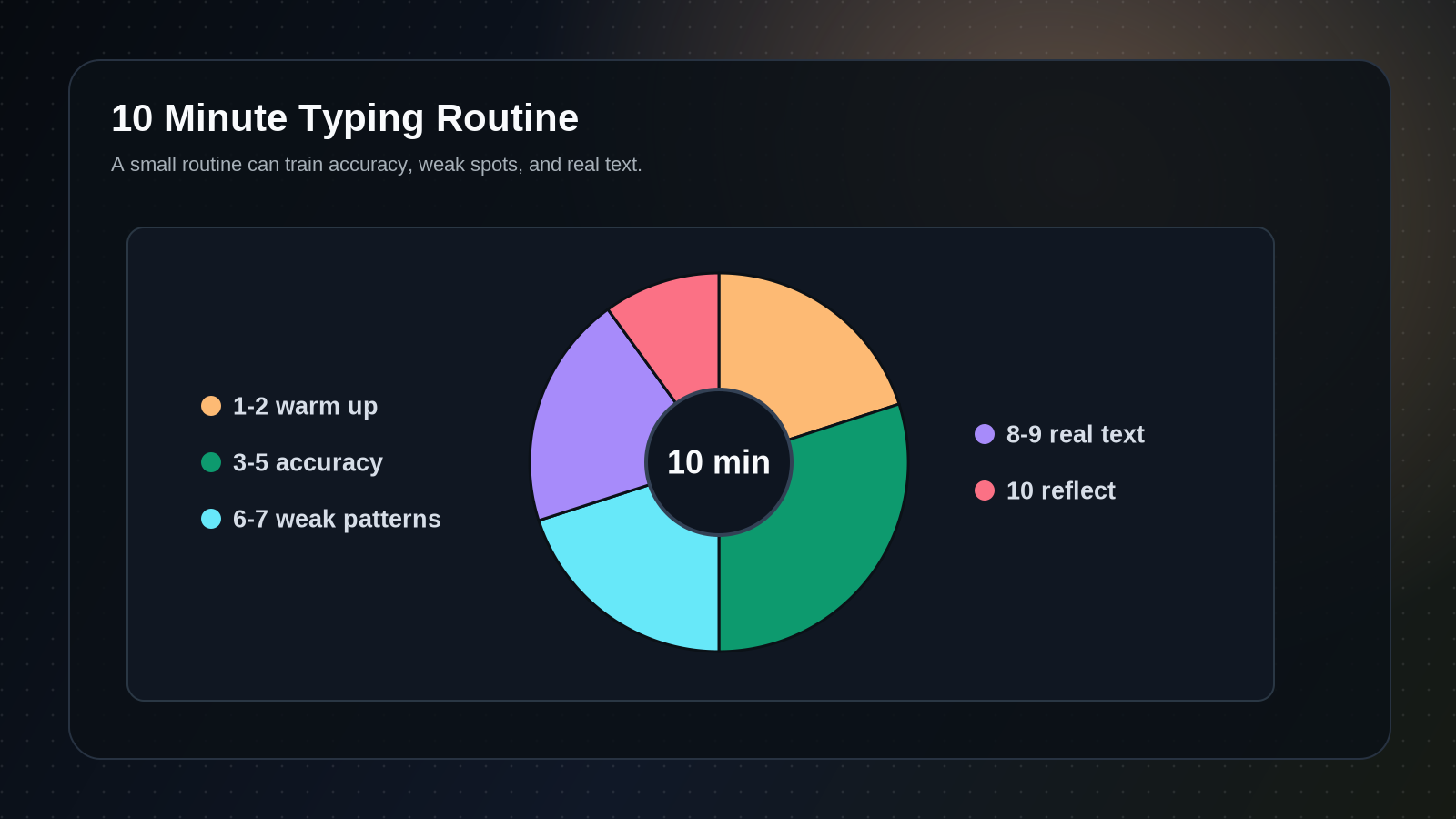
Minute 3 to 5: accuracy block
Slow down until you can type with very few mistakes.
Correct errors when they happen. Notice whether the same key, finger, or word keeps causing trouble.
This block protects the quality of your movement.
Minute 6 and 7: weak pattern drill
Pick one weakness.
It might be "th," "ion," commas, capital letters, numbers, or your left ring finger.
Do not drill everything. Drill one thing well.
Minute 8 and 9: real text
Use a paragraph, quote, email-style sentence, code snippet, or support reply.
Real text matters because it has meaning, punctuation, and rhythm.
This is where the drill has to become useful.
Minute 10: reflect
Write down one short note:
- What felt better?
- What kept breaking?
- What should I practice tomorrow?
That note turns a random session into a learning loop.
Run the routine on Keytopia
Keytopia is a good home for this routine because you can move between lessons, normal practice, games, races, analytics, code, numbers, and certificates.
The modern UI helps too. A routine is easier to repeat when the practice screen, results, games, and milestones feel like one connected product.
Use one Keytopia session a day. Keep it short. Let the progress build quietly.
Change the length or order when the learner, task, or access need calls for it. Stop if pain appears.
A weekly version of the ten-minute routine
Use the same ten-minute shape each day, but change the focus across the week.
Monday: baseline test and accuracy notes.
Tuesday: weak keys.
Wednesday: common words and rhythm.
Thursday: numbers or punctuation.
Friday: a longer passage.
Saturday: games or races after a short warm-up.
Sunday: easy review and one clean test.
That keeps practice from becoming stale while still giving each skill enough repetition to matter.
The secret is not that ten minutes is magical. It is that ten minutes is easy to repeat. A repeatable routine beats an ambitious routine you abandon.
What to track besides WPM
If you only track WPM, you will rush.
Track accuracy, weak keys, consistency, and how the session felt. Did your shoulders creep up? Did your eyes drop to the keyboard? Did punctuation break rhythm? Did you stop breathing during the speed run?
Those notes are not soft data. They tell you why the number moved.
Keytopia gives you the measurable part. Add one sentence of your own after each session, and you will see patterns faster: "commas are still messy," "better after warm-up," "too tired at night," "three minutes is where I fade." That is how a tiny routine becomes a real plan.
When to skip the full routine
A routine should be sturdy, not brittle.
If you are exhausted, sore, or short on time, skip the session or choose a small comfortable activity. Do not treat a streak as more important than rest or pain.
The only rule is to avoid turning "not perfect today" into "nothing for a week." Tiny practice keeps the door open for tomorrow.
FAQs
Is 10 minutes of typing practice enough?
It is enough to start a repeatable habit and run a focused drill. It is not a guaranteed dose for improvement. Adjust it for the learner, goal, fatigue, and available time.
Should I practice typing every day?
Daily practice is optional. Choose a schedule you can repeat without pain or fatigue. Compare results under the same conditions before deciding whether the schedule helps.
What should I practice first?
Start with accuracy and key comfort. Speed practice works better after your hands know the movement.
How long until a daily routine improves WPM?
There is no reliable universal timeline. Compare several runs after a fixed practice period and keep the duration, language, layout, and text type the same.
Sources
Independent research, official documentation, and source pages behind the claims above.
Key takeaway
Use the ten-minute plan as a template. Keep the test conditions consistent, change one weakness at a time, and adjust the session length for comfort and the goal.
Free Keytopia typing test
Take a typing test and set an honest starting point
A clean baseline shows your WPM, accuracy, errors, consistency, and the keys that need attention first.
No account needed. Save your history after sign-in.
- PaceAverage, raw, peak and low WPM
- ControlAccuracy, errors, consistency and CPM
- TimingReaction, overlap, hold, rhythm and recovery
- PatternsTimeline, heatmap, word, key and bigram speed