
Focus on accuracy when repeated errors or corrections reduce the score that matters for your task. Add controlled speed practice when results are stable across several comparable runs. Use an official accuracy requirement when one exists instead of a universal threshold.
- Speed without accuracy is not real speed. It is delayed correction work.
- The best practice alternates calm accuracy blocks and short speed bursts.
- A lower WPM with clean output can be more useful than a higher messy score.
Free Keytopia typing test
Take a typing test and find the errors costing you speed
Get accuracy, error count, correction detail, weak keys, per-key speed, and slow letter pairs in one result.
- PaceAverage, raw, peak and low WPM
- ControlAccuracy, errors, consistency and CPM
- TimingReaction, overlap, hold, rhythm and recovery
- PatternsTimeline, heatmap, word, key and bigram speed
No account needed. Save your history after sign-in.
Why accuracy comes first
A typing score can look good while the real output is messy.
If you type fast but keep backspacing, rereading, and fixing words, the headline WPM is lying to you a little.
Accuracy gives speed a stable floor. Once your hands can move cleanly, speed practice works much better.
When to focus on accuracy
Focus on accuracy if you keep missing the same key.
Focus on accuracy if punctuation makes you tense.
Focus on accuracy if error penalties or correction time create a large gap between attempted pace and usable output.
That is not slow practice. That is repair work.
How to judge progress
Do not judge progress only by your best score.
Look at average WPM, accuracy, backspaces, consistency, and whether you can type longer text without fading.
A personal best is fun. A stronger baseline is more useful.
Practice both inside Keytopia
Keytopia helps because you can use different modes for different goals.
Use calm practice for accuracy. Use races or short tests for speed. Use analytics to see whether your mistakes repeat.
That mix keeps you from turning every session into the same frantic WPM chase.
A simple decision rule
If repeated errors or correction penalties are holding down the result, train accuracy first. If accuracy is stable across several comparable runs and speed feels capped, add controlled speed work. If short tests are stable but longer text falls apart, train endurance.
Use any official accuracy threshold for the task. Without one, let the repeated error pattern choose the next drill.
Speed practice exposes your next weakness. Accuracy practice fixes it. Endurance practice proves it holds.
Good training rotates all three, but not in equal amounts every day. Your latest Keytopia result should decide the next session.
Use fast blocks without letting them teach bad form
Fast practice is useful when it is short.
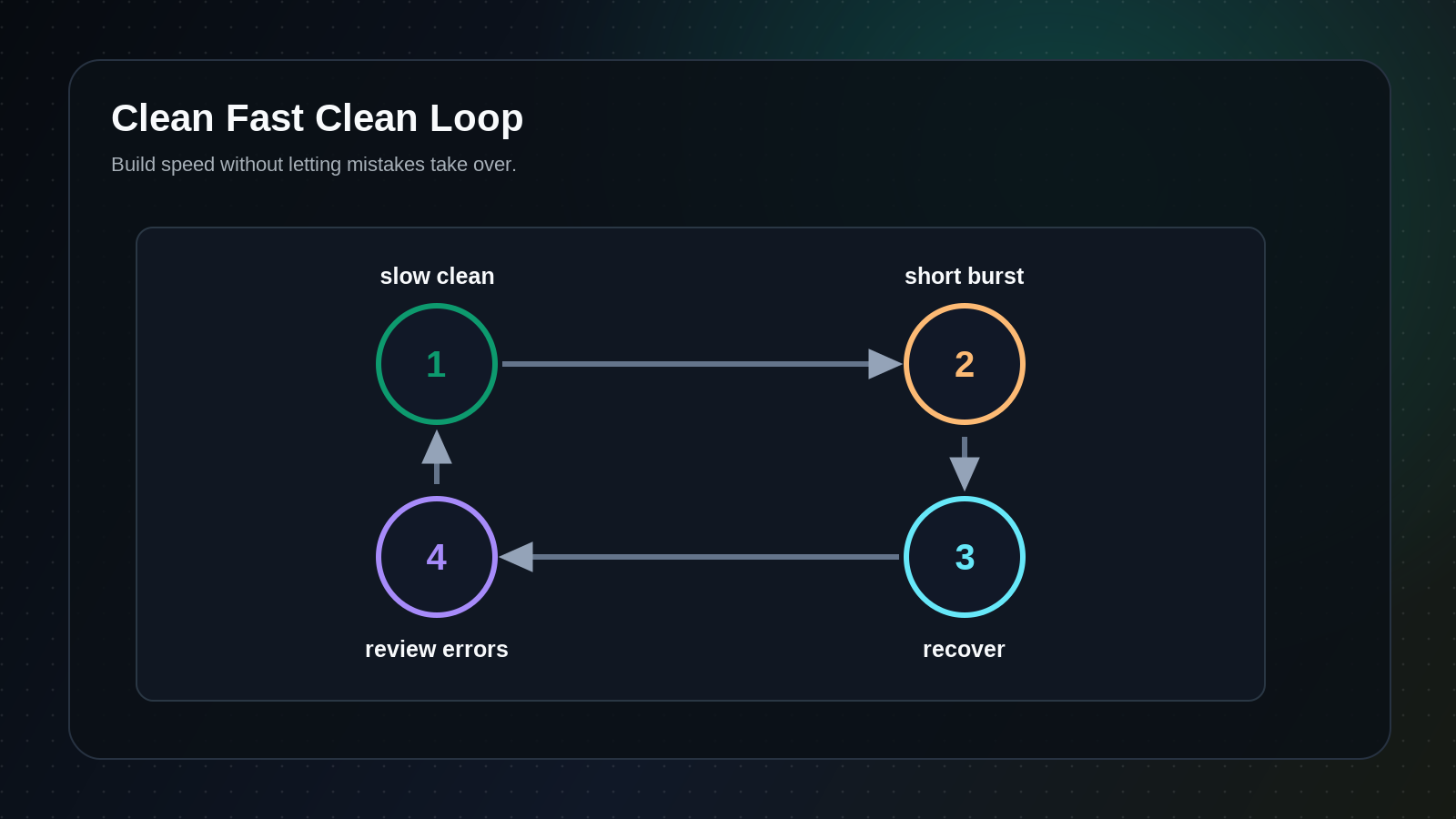
Try this pattern: two minutes calm, twenty seconds fast, one minute calm. The fast block lets your hands feel a higher pace. The calm block checks whether your form survived.
If your next calm block is full of mistakes, the fast block was too aggressive. If the calm block feels easier, the burst did its job.
This is how you raise speed without turning every session into a mess. You visit the edge, then return to control.
Give each run one job
A practice run should not try to improve everything at once.
Before you start, name the job: accuracy, speed, consistency, weak keys, punctuation, or endurance. Then judge the run by that job.
If today's job is accuracy, a slower WPM is not failure. If today's job is speed exposure, a small accuracy dip may be acceptable. Clear intent keeps practice honest and stops every result from feeling like a verdict on your ability.
FAQs
Is 95 percent typing accuracy good?
It may meet some goals and miss others. Check how the platform calculates accuracy, the length and text type, and any official requirement. Then work on repeated errors rather than treating one percentage as universal.
Can I improve speed and accuracy at the same time?
Yes, but not by rushing every session. Alternate accuracy blocks with short speed bursts so one skill does not damage the other.
Why does my accuracy drop when I type faster?
Your hands are moving faster than the pattern they know. Slow down, rebuild the movement, then add speed in smaller bursts.
What is better, 70 WPM with 98 percent accuracy or 85 WPM with 90 percent?
The percentages alone are not enough because platforms calculate scores differently. Compare the final correct output, correction time, test type, and the scoring rule for your task.
Sources
Independent research, official documentation, and source pages behind the claims above.
Key takeaway
Accuracy builds the floor. Speed raises the ceiling. Train them in that order, then alternate both so your typing gets faster without getting messier.
Free Keytopia typing test
Take a typing test and find the errors costing you speed
Get accuracy, error count, correction detail, weak keys, per-key speed, and slow letter pairs in one result.
No account needed. Save your history after sign-in.
- PaceAverage, raw, peak and low WPM
- ControlAccuracy, errors, consistency and CPM
- TimingReaction, overlap, hold, rhythm and recovery
- PatternsTimeline, heatmap, word, key and bigram speed