
If typing causes pain, stop the session. A workstation change may reduce strain, but an article cannot diagnose the cause. Seek advice from a qualified health professional when symptoms persist, recur, worsen, or include numbness, tingling, weakness, or swelling.
- Pain is not a badge of serious practice.
- Workstation position, task duration, repetition, and force can affect comfort, but pain can have many causes.
- Do not push through discomfort. Stop and seek qualified advice if symptoms persist or return.
Free Keytopia typing test
Test your setup before you change it
Run the same test before and after a change. Compare errors, rhythm, reaction time, key overlap, and hold time.
- PaceAverage, raw, peak and low WPM
- ControlAccuracy, errors, consistency and CPM
- TimingReaction, overlap, hold, rhythm and recovery
- PatternsTimeline, heatmap, word, key and bigram speed
No account needed. Save your history after sign-in.
Pain is a signal, not a training plan
Typing can feel awkward when you learn a new technique. It should not feel painful.
If your wrist, fingers, hand, shoulder, or neck hurt during practice, stop. Resting and checking the setup are reasonable first steps, but they are not a diagnosis or treatment.
Do not try to win a typing test by ignoring pain. That is a bad trade.
Check your wrist position
A common problem is bending the wrist up, down, or sideways while typing.
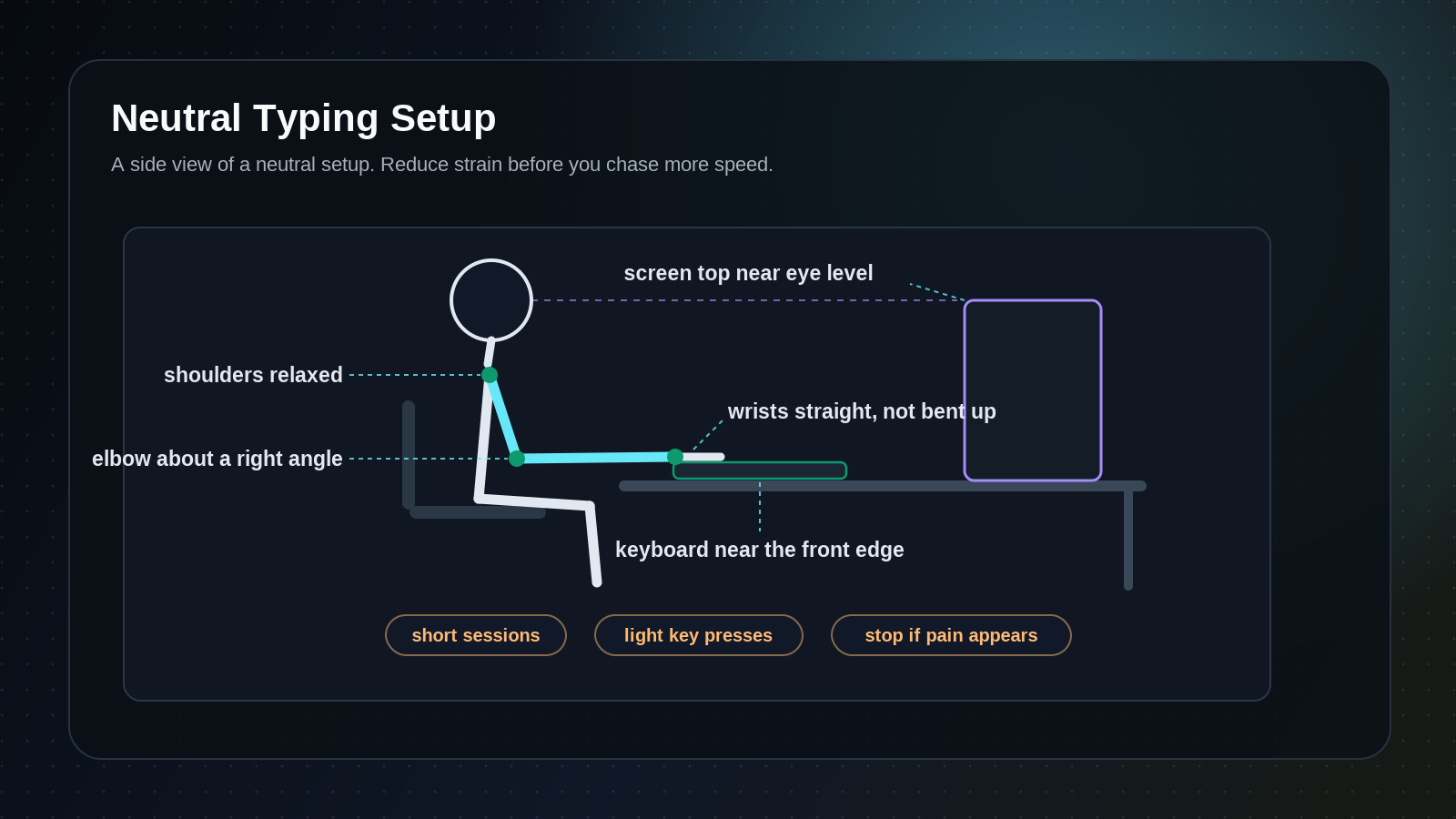
Try to keep your wrists close to straight. Keep the keyboard close enough that you are not reaching. Keep your shoulders relaxed.
If a wrist rest makes you press weight into your wrist while typing, use it only during pauses. Your hands should not be trapped.
Shorten the practice session
If symptoms appear during a session, stop rather than forcing a target duration.
Do not resume simply because a shorter timer sounds safe. If symptoms return, get advice from a qualified health professional or an ergonomics specialist who can assess the person and the task.
When you do return, use a lighter workload and observe the whole setup. Keyboard height, pointing-device position, chair, screen, workload, and breaks can all matter.
Look for tension
Many learners hold their hands stiff because they are afraid of mistakes.
That tension makes typing feel harder. It can also make pain worse.
Slow down. Use lighter key presses. Let your shoulders drop. Keep your hands moving calmly instead of stretching one finger too far.
When to get help
This article is not medical advice.
If pain keeps coming back, spreads, includes numbness or tingling, or stops you from normal work, talk to a qualified health professional.
Typing practice is supposed to help your life. It should not become the thing that damages it.
Use Keytopia gently
Keytopia can help you build skill without turning practice into a painful grind.
Keep sessions short, choose calm practice when your hands feel tired, and stop if pain appears. Games and races are useful, but they should not push you into tension.
The best typing routine is the one your body can repeat safely.
Do not practice through pain
A typing article cannot diagnose wrist pain, and it should not pretend to.
If typing causes sharp pain, numbness, tingling, weakness, swelling, or pain that keeps returning, stop and get qualified medical advice. An ergonomics assessment may also help with the task and workstation. More practice is not a treatment.
For mild discomfort, stop first. A setup check can look at shoulder position, wrist angle, keyboard distance, force, pointing-device use, and workload. If symptoms return, get qualified advice.
OSHA's keyboard guidance points toward neutral posture: elbows around keyboard height, shoulders relaxed, wrists not bent up, down, or sideways. That is the posture you want before you increase practice time.
A safer practice pattern when your hands get tired
If your hands fatigue quickly, do not train like a speedrunner.
There is no safe universal block length. Type at a relaxed pace and stop when fatigue changes your form. Do not resume if pain or other symptoms return.
Keep the target boring: smooth rhythm, light key presses, high accuracy. Avoid long all-out tests until your setup and comfort are reliable.
Keytopia can help because you can use short tests and lessons instead of forcing one long grind. The right practice session should leave your hands feeling awake, not punished.
FAQs
Is wrist pain normal when learning touch typing?
Mild awkwardness can happen. Pain is different. Stop, rest, check your setup, and shorten sessions. If pain continues, get professional advice.
Should my wrists rest on the desk while typing?
Avoid pressing weight into your wrists while actively typing. A palm rest can be useful during pauses, but your wrist position should stay neutral.
Can a split keyboard fix wrist pain?
A split keyboard can change wrist and shoulder position, but it is not a treatment and evidence does not support a universal fix. If pain persists, get professional advice.
How long should I practice if my hands get tired?
Pause when fatigue changes your form or comfort. There is no safe universal session length. If fatigue or pain keeps returning, discuss it with a qualified health professional.
Sources
Independent research, official documentation, and source pages behind the claims above.
- OSHA keyboard placement guidancehttps://www.osha.gov/etools/computer-workstations/components/keyboards
- CDC NIOSH, office environments and ergonomic designhttps://www.cdc.gov/niosh/office-environment/about/
- NHS, repetitive strain injury overview and when to seek helphttps://www.nhs.uk/conditions/repetitive-strain-injury-rsi/
- Mayo Clinic, office ergonomics guidehttps://www.mayoclinic.org/healthy-lifestyle/adult-health/in-depth/office-ergonomics/art-20046169
Key takeaway
Typing practice should not continue through pain. Stop, review the task and setup, and seek qualified advice when symptoms persist, recur, or include neurological signs.
Free Keytopia typing test
Test your setup before you change it
Run the same test before and after a change. Compare errors, rhythm, reaction time, key overlap, and hold time.
No account needed. Save your history after sign-in.
- PaceAverage, raw, peak and low WPM
- ControlAccuracy, errors, consistency and CPM
- TimingReaction, overlap, hold, rhythm and recovery
- PatternsTimeline, heatmap, word, key and bigram speed