
A useful typing curriculum teaches a small group of keys, uses them in real words, revisits them through spaced practice, and checks progress in normal writing. A 12-week plan can work with two or three short sessions each week. Adjust the pace, input method, and goals for the class.
- Sequence and review matter more than one long weekly session.
- Measure accuracy, independence, comfort, and transfer alongside WPM.
- Games should support the week’s learning goal.
Free Keytopia typing test
Take the same baseline you would give a learner
See the learner result first-hand, including WPM, accuracy, consistency, weak keys, rhythm, and error recovery.
- PaceAverage, raw, peak and low WPM
- ControlAccuracy, errors, consistency and CPM
- TimingReaction, overlap, hold, rhythm and recovery
- PatternsTimeline, heatmap, word, key and bigram speed
No account needed. Save your history after sign-in.
Set the classroom goal
Write a goal that connects typing to student work.
For example: students will type a short paragraph while looking mainly at the screen, correct errors calmly, and use a comfortable keyboard position.
Add a speed target only when the school has a sound reason and a fair way to set it. Do not copy an adult internet benchmark into a children's curriculum.
Use the same short lesson routine
A 15-minute lesson can include:
- Two minutes of posture and known-key review
- Five minutes on the new key group
- Five minutes of words or sentences
- Three minutes of transfer and reflection
Keep the order familiar. Change the text, not the basic classroom routine.
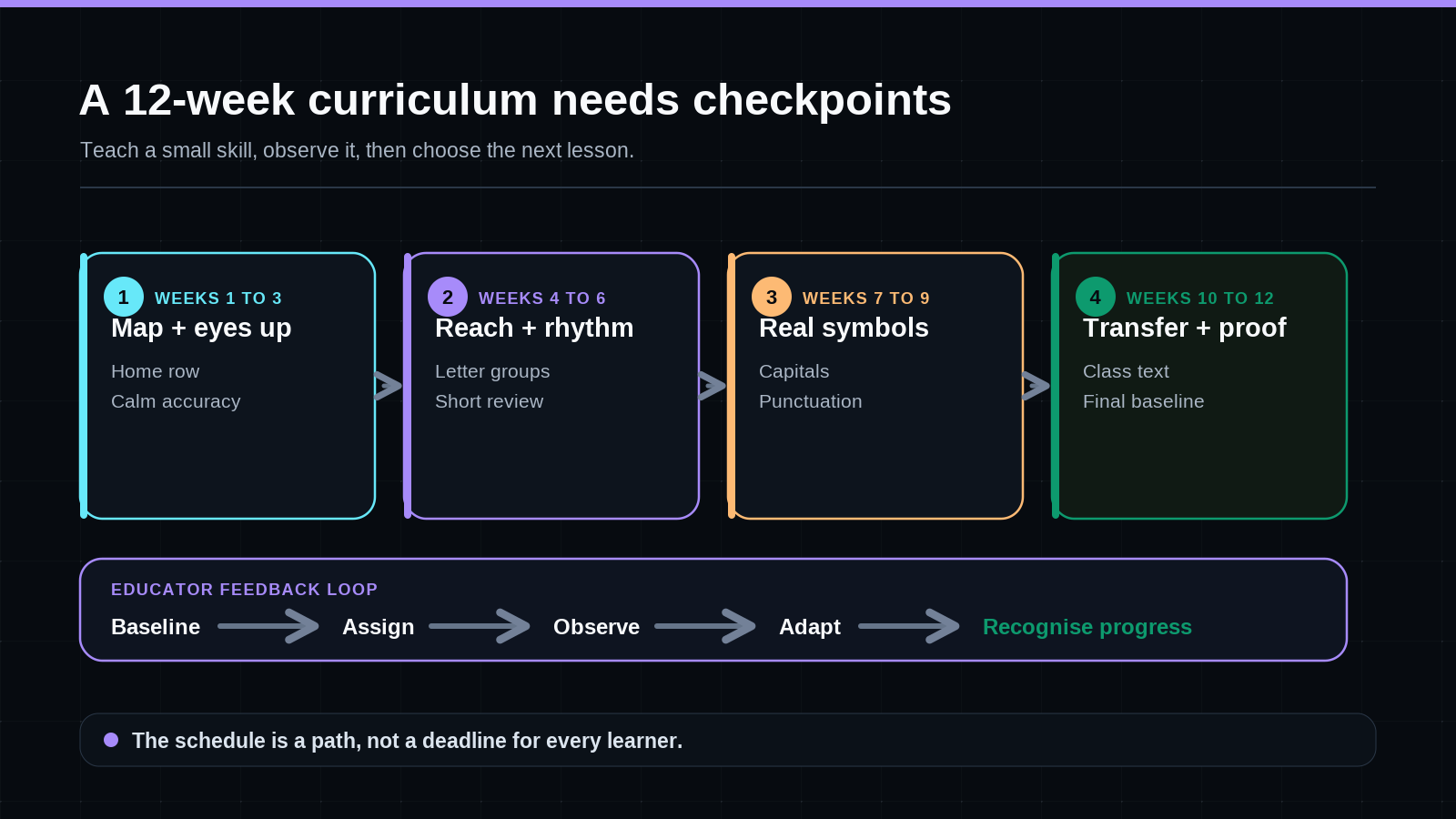
Plan weeks 1 to 4
Week 1: baseline, setup, and home position.
Week 2: first home-row key group in short words.
Week 3: remaining home-row keys and simple sentences.
Week 4: review, Shift, space, backspace, and one low-pressure progress check.
Move forward only when students can use the current keys with reasonable control. Give extra practice without presenting it as punishment.
Plan weeks 5 to 8
Week 5: first top-row key group.
Week 6: remaining top-row keys and mixed words.
Week 7: first bottom-row key group.
Week 8: remaining bottom-row keys and a short paragraph.
Every session should include older keys. Use vocabulary from current class topics when it is readable and age-appropriate.
Plan weeks 9 to 12
Week 9: capitals and common punctuation.
Week 10: numbers or symbols when the curriculum needs them.
Week 11: editing, shortcuts, and a real classroom task.
Week 12: final repeated task, student reflection, and next-step plan.
The final check should use conditions similar to the baseline. It should also include a normal writing task, not only a copying test.
Use a fair progress record
Record a small set of measures:
- Accuracy on a repeated task
- WPM under the same conditions
- Ability to keep eyes on the source or screen
- Comfort and access notes
- Completion of a real classroom task
Do not rank students publicly. Share progress with the learner and the people who need it for teaching.
Plan for access, privacy, and recovery
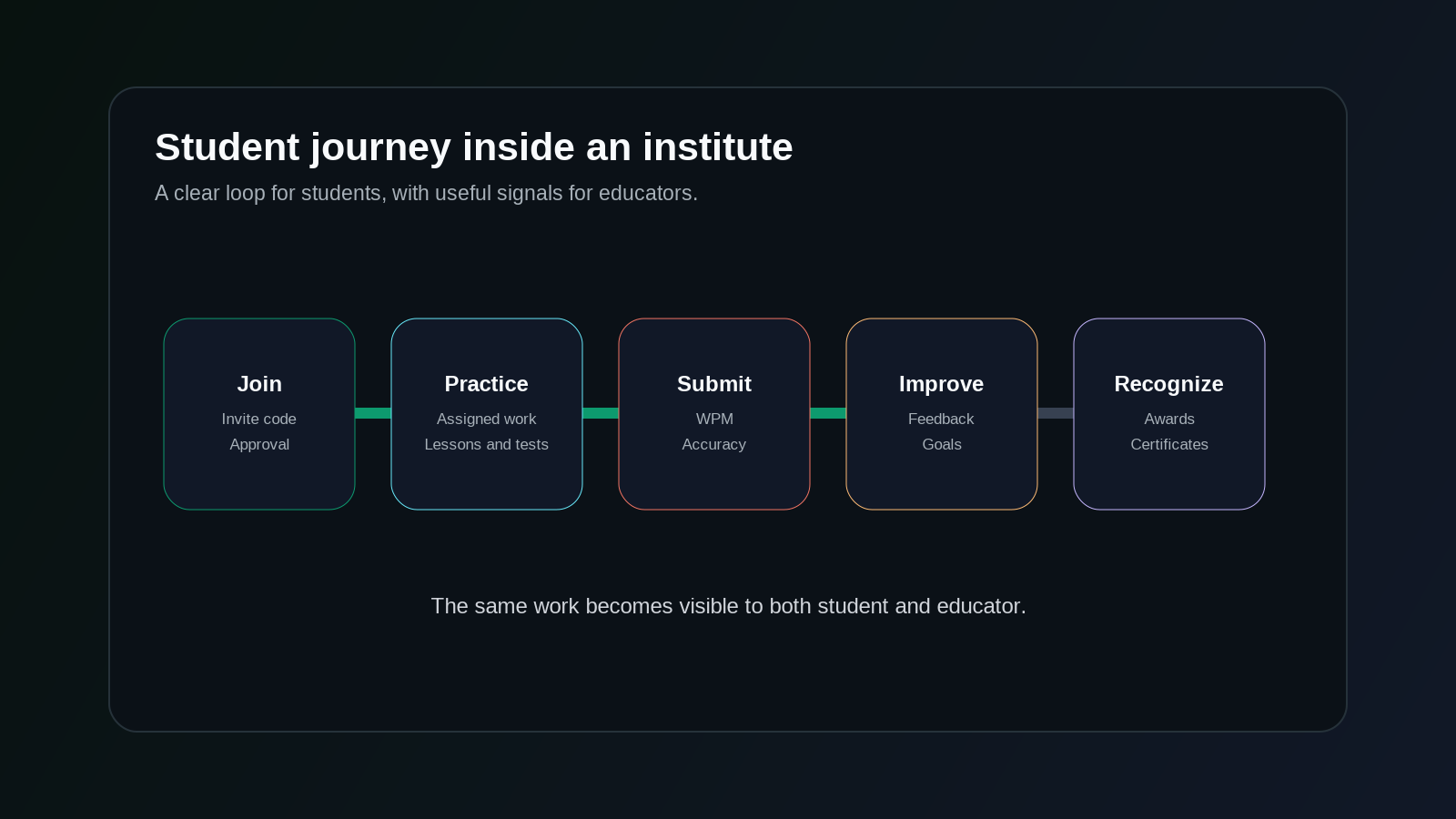
Offer alternate input tools, larger text, reduced motion, breaks, or another pace when needed. Follow student access plans.
Review the product's privacy terms and school requirements before creating accounts. Collect only the data the lesson needs.
If the class misses a week, review known keys before adding more. A curriculum is a path, not a deadline that every student must cross at the same moment.
Turn class results into the next assignment
Do not give the whole class the same extra drill when the results show different limits.
Use this classroom decision guide:
- Class accuracy falls after new keys: review the key group with simpler words.
- Accuracy is good but consistency varies: use a shared rhythm task with familiar text.
- Several students have the same weak key area: reteach that movement to a small group.
- Only a few students have the issue: assign a short targeted practice instead of slowing the whole class.
- Timelines fall near the end: shorten the current task, then build duration in small steps.
- Copy scores improve but normal writing does not: add more transfer tasks.
For individual review, use Keytopia's accuracy, errors, consistency, timeline, keyboard heatmap, per-key speed, and bigram data. Each signal should lead to a question. It should not become a label for the student.
Keep the next assignment narrow. A five-minute targeted task is easier to review than a large mixed practice set. Check the same pattern again after the assignment.
Use three comparable checkpoints
Plan a baseline, midpoint, and final checkpoint. Keep their conditions as close as possible.
Use this record:
- Week 1 baseline: one repeated copy task and one short original-writing task
- Week 6 midpoint: the same copy format and a similar writing task
- Week 12 final: the same copy format and a similar writing task
Keep the duration, device type, language, correction rule, and approved supports steady. Use different text at a similar difficulty so students do not simply memorize the passage.
Compare WPM, accuracy, errors, and consistency on the copy task. On the writing task, also record keyboard independence, use of capitals and punctuation, editing, and task completion.
The checkpoint should not consume the full lesson. It is evidence for the next teaching choice. Share personal progress privately. Do not turn the checkpoint into a public speed contest.
Teach one worked Week 7 lesson
Week 7 introduces the first bottom-row key group. A 15-minute lesson can follow this plan:
- Review home position for two minutes.
- Model each new key and its finger for two minutes.
- Type short controlled patterns for three minutes.
- Type familiar words that contain the new keys for three minutes.
- Type two meaningful sentences for three minutes.
- Use the last two minutes for a reflection and next step.
Prepare three text levels before class:
- Support: fewer new keys and shorter words
- Core: the planned word and sentence set
- Extension: the same keys in a longer paragraph
The levels keep one learning goal while changing the load. A student can move between levels without a public label. If an access plan requires a different input method, keep the same communication goal and follow the plan.
FAQs
How often should schools teach typing?
Two or three short sessions each week can support steady review. Adjust the schedule to student needs and curriculum time.
Should typing be graded by WPM?
WPM can be one measure, but it should not stand alone. Include accuracy, access, independence, comfort, and real-task completion.
Can games replace typing lessons?
Games can reinforce a key group or pattern. They do not replace a clear sequence, teacher feedback, and transfer into normal writing.
How should a late-joining student enter a 12-week typing plan?
Give a short private baseline and start with the key group the student can use with control. Add review assignments as needed. Do not place the student by calendar week alone.
Sources
Independent research, official documentation, and source pages behind the claims above.
Key takeaway
Use short repeated lessons, spaced review, real writing tasks, and private personal progress.
Free Keytopia typing test
Take the same baseline you would give a learner
See the learner result first-hand, including WPM, accuracy, consistency, weak keys, rhythm, and error recovery.
No account needed. Save your history after sign-in.
- PaceAverage, raw, peak and low WPM
- ControlAccuracy, errors, consistency and CPM
- TimingReaction, overlap, hold, rhythm and recovery
- PatternsTimeline, heatmap, word, key and bigram speed