
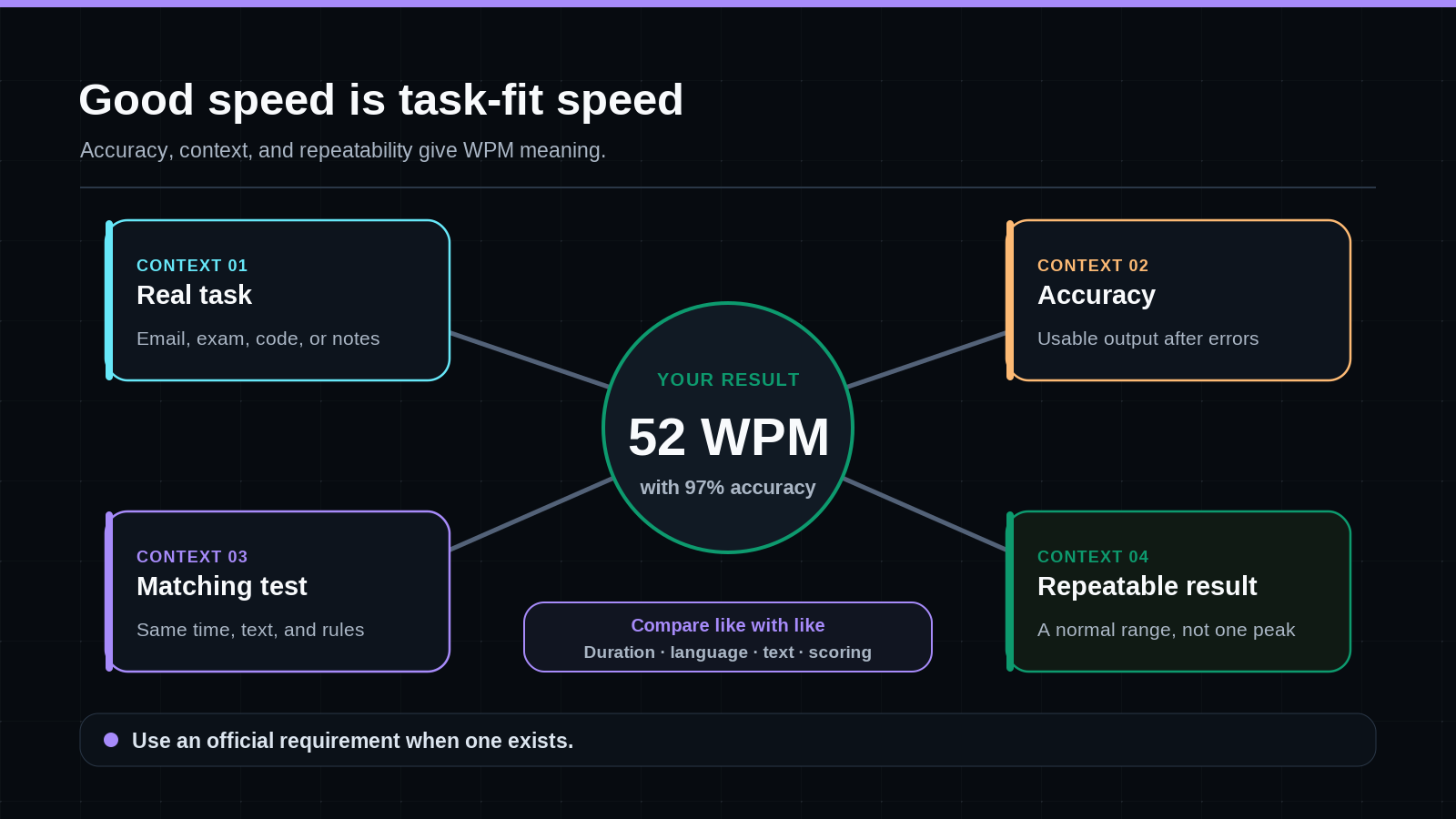
A good typing speed is one that meets your real task or published requirement with repeatable accuracy. Compare scores only when the duration, language, text type, and scoring rules match.
- A benchmark is useful only when its sample and test method are clear.
- Different tasks need different speeds: chat, essays, code, support, and data entry are not the same.
- A useful next goal should be small enough to practise without losing control.
Free Keytopia typing test
Take a typing test before choosing your next drill
See average, raw, peak, and low WPM alongside accuracy, consistency, word speed, rhythm, and your performance timeline.
- PaceAverage, raw, peak and low WPM
- ControlAccuracy, errors, consistency and CPM
- TimingReaction, overlap, hold, rhythm and recovery
- PatternsTimeline, heatmap, word, key and bigram speed
No account needed. Save your history after sign-in.
Start with the task, not a universal label
People ask "What is a good typing speed?" because they want one number. There is no universal cutoff.
A student taking notes, a customer-support agent following an employer test, a data-entry worker using numbers, and a competitive typist are doing different tasks. Test length also matters. A short common-word test is not directly comparable with five minutes of punctuation, code, or unfamiliar prose.
If a job or exam publishes a requirement, that is your target. If it does not, use a repeatable baseline on text that resembles your real work.
What large datasets can tell us
The 2018 Aalto University study cited below analysed 136 million keystrokes from more than 168,000 volunteers. The sample averaged about 52 WPM in a transcription task. The authors also found large differences in technique and performance.
Ratatype published a separate 2026 analysis of 506,024 completed tests. Its result is useful for understanding its own test population, but it is not a census of all typists.
These datasets provide context, not a rule for what you should type. Always note who took the test, what they typed, how long the test lasted, and how errors were counted.
Accuracy changes the meaning of every WPM score
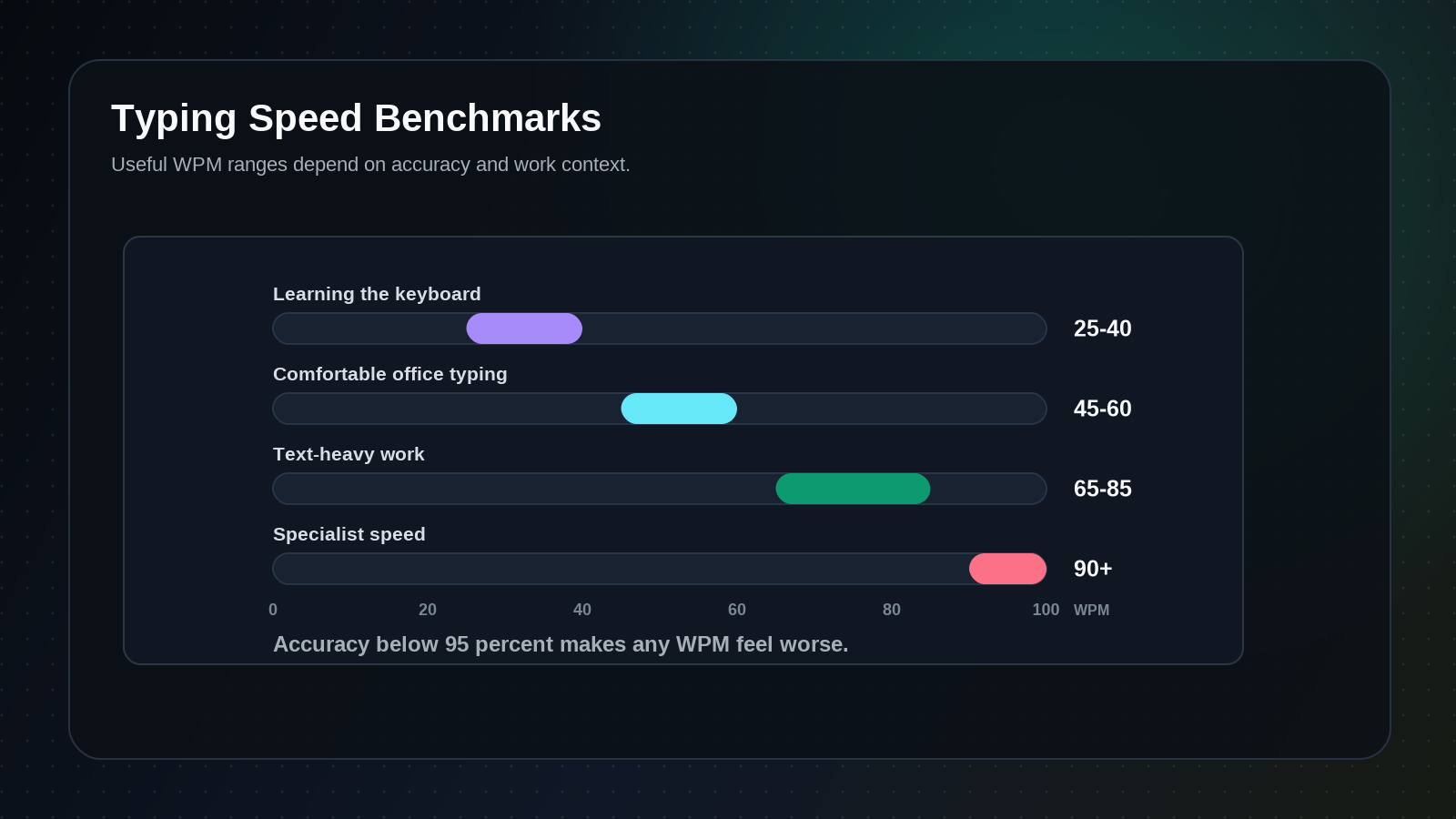
A 75 WPM test with many errors is not the same performance as a 75 WPM test with few errors.
Low accuracy creates hidden work: backspaces, rereads, corrections, and sometimes embarrassing mistakes.
There is no universal accuracy cutoff. Use an official requirement when one exists. Otherwise, compare your error count and correction behaviour on the same test type over time. Once those are stable, a speed goal becomes more meaningful.
Set the next goal, not the fantasy goal
If you type 34 WPM today, a weekly goal of 100 WPM is unlikely to guide useful practice.
Choose a small improvement on the same test format. You might aim for fewer repeated errors, a steadier one-minute result, or a slightly faster five-minute result without extra corrections.
Set the goal, practise for a fixed period, then compare several runs. One personal best can be luck. A better group of repeatable scores is stronger evidence.
Measure your baseline on Keytopia
A good target starts with a real baseline.
Use Keytopia to check your WPM and accuracy, then practice with the mode that matches your goal: beginner lessons, normal text, numbers, code, races, or longer sessions.
Do not train for someone else's screenshot. Train for the next useful speed in your own work.
Benchmarks need a sample and a method
A good typing speed depends on what you need it for.
The 2018 Aalto University study found an average of about 52 WPM in its large online transcription sample. That figure describes the study’s volunteers and task. It does not establish job, age, or grade bands.
Ask four questions before using a benchmark: Who took the test? What text did they type? How long was the test? How were errors counted?
The better personal question is whether you can meet your task or official requirement on realistic text under repeatable conditions.
Use the score the real task uses
Raw WPM, correct-character WPM, and net WPM are not defined the same way on every platform.
For a job or exam, use its published formula. For personal practice, compare the same Keytopia mode and duration over time.
On Keytopia, compare WPM with raw WPM, accuracy, and consistency. If attempted pace rises while correct output does not, inspect the errors and corrections.
A good typing speed is the speed you can repeat without turning the next five minutes into correction work.
FAQs
Is 40 WPM good?
It may be enough for your current task, but the number alone cannot answer the question. Check accuracy, duration, text type, and any published requirement.
Is 60 WPM good?
It is faster than the average reported in some large online transcription samples, but those samples do not define your needs. Judge it against the same test conditions and your real task.
Is 100 WPM necessary?
No. Most jobs do not require 100 WPM. Use the requirement for your role or the pace that makes your own work comfortable and accurate.
What is the best typing speed for jobs?
It depends on the employer and role. Use the speed, accuracy, duration, language, and scoring rules in the job posting or official test notice.
Sources
Independent research, official documentation, and source pages behind the claims above.
- Dhakal et al., observations from 136 million keystrokes (CHI 2018 PDF)https://acris.aalto.fi/ws/portalfiles/portal/21495207/ELEC_Dhakal_et_al_Observations_CHI2018.pdf
- Cambridge, what makes a faster typisthttps://www.cam.ac.uk/research/news/what-makes-a-faster-typist
- Ratatype, 2026 analysis of 506,024 typing testshttps://www.ratatype.com/typing-tips/3004-what-typing-speed-is-considered-good-real-data-from-506000-tests/
Key takeaway
A good typing speed is the speed that lets you do your real work without the keyboard constantly interrupting you. Start with accuracy, then raise your baseline one step at a time.
Free Keytopia typing test
Take a typing test before choosing your next drill
See average, raw, peak, and low WPM alongside accuracy, consistency, word speed, rhythm, and your performance timeline.
No account needed. Save your history after sign-in.
- PaceAverage, raw, peak and low WPM
- ControlAccuracy, errors, consistency and CPM
- TimingReaction, overlap, hold, rhythm and recovery
- PatternsTimeline, heatmap, word, key and bigram speed